The brand profile is one of the most important elements of project configuration. This is where you describe the company, website, market, target group, and offer that Semly will analyze in AI visibility reports.
A well‑filled profile helps the system better recognize your brand, compare it with the competition, and prepare more accurate recommendations.
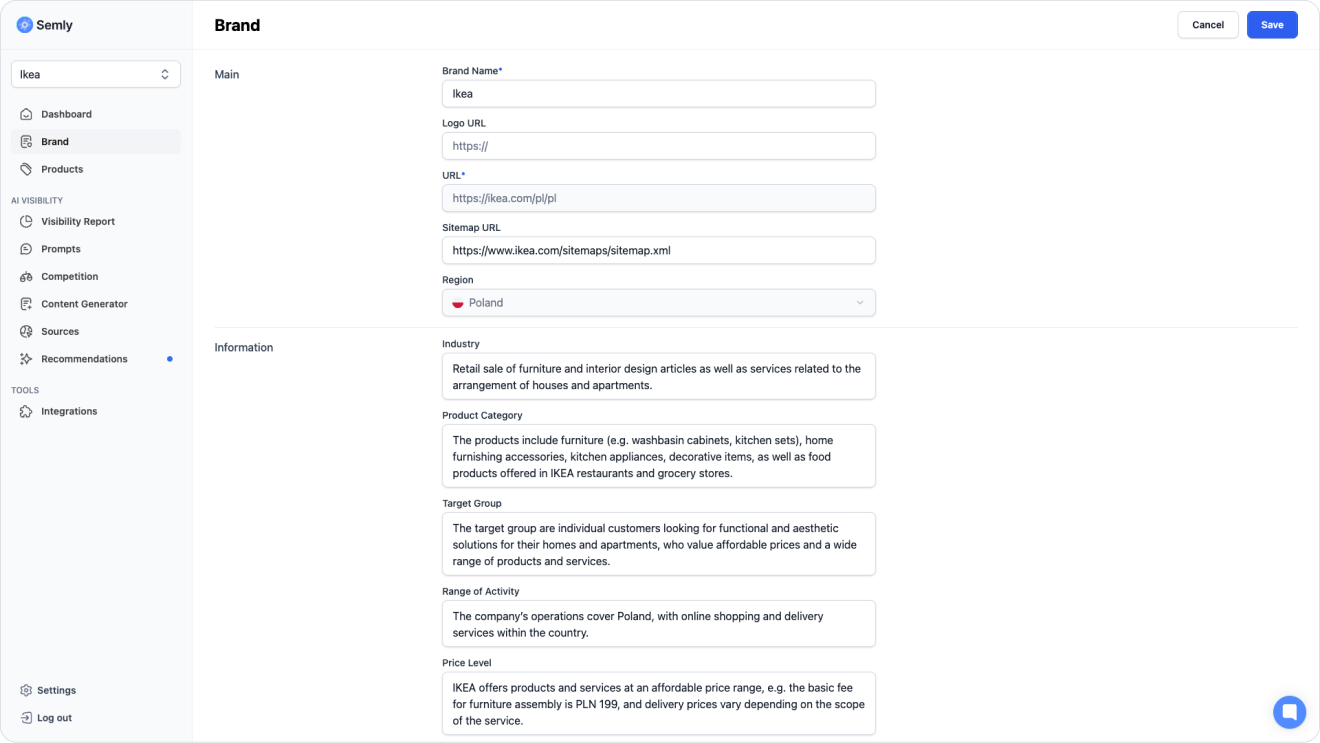
Semly analyzes how your brand appears in the answers of AI models such as ChatGPT, Gemini, Claude, Grok, or Google AI Overviews.
To make the results as accurate as possible, the system needs basic information about your company.
The brand profile helps answer questions like:
what kind of brand is it
what is its official website
which market does it operate in
which industry does it represent
what products or services does it offer
who is its target group
what makes it stand out from the competition
what business model does it use

To complete the brand profile:
Log in to the Semly panel
Go to the Brand
Fill in or correct the data
Save changes
In the brand profile you’ll find several fields that describe your company and help Semly understand its business context.
Below you’ll find a description of the most important fields:
Enter the official brand name that should be monitored in AI responses.
This can be the name of a store, company, manufacturer, app, platform, or service.
Examples:
Semly
RedCart
IKEA
Amazon
OpenAI

The URL of your website, e.g. https://yourdomain.com, was provided when creating the account and can’t be changed manually in the panel.
If the address contains an error or needs to be updated, contact our support team: [email protected]
A sitemap helps systems understand the structure of your site more quickly.
Most often, the sitemap address looks like this:
https://yourdomain.com/sitemap.xmlor:
https://yourdomain.com/sitemap_index.xmlAdding a sitemap helps point out the most important URLs on the site, such as category pages, products, articles, guides, and info subpages.

Example robots.txt file:
https://yourdomain.com/robots.txtIn this field you can add the direct URL to the brand logo.
The logo is added to knowledge base pages.
Example:
https://yourdomain.com/logo.svgor:
https://yourdomain.com/assets/logo.pngThe operating region defines the main market and language in which Semly analyzes your brand’s visibility in AI.
This setting is chosen during project setup and you can’t change it later on your own in the panel, because all research, prompts, AI model answers and reports are done in the context of the selected market.
Examples of regions:
Poland
Czech Republic
Germany
United States
The region matters because AI answers can differ depending on the country, language, available sources and the user’s cultural context.
The industry helps define the main area of the brand’s activity.
Examples:
e-commerce
fashion
cosmetics
dietary supplements
home equipment
local services, e.g. tailoring
education
finance
A well-chosen industry helps Semly analyze the brand in the right context and compare it with the right competitors.
Too generic: “Trade”
Better:
“Online store with home equipment”
In this field, describe the main categories of products or services that the brand offers.
Examples for e-commerce:
living room furniture
natural cosmetics
supplements for athletes
cosmetic packaging
women’s clothing
pet accessories
Examples for services:
creating online stores
dermatology consultations
accounting services for companies
online language courses
interior design
The target group describes who the brand’s offer is aimed at.
You can specify the type of customers, their needs, level of advancement, or buying situation.
Examples:
online store owners
beginner online sellers
people looking for natural cosmetics
parents of young children
athletes and physically active people
manufacturing companies
beauty salons
B2B clients
A well-described target group helps Semly better understand for which prompts the brand should be visible.
The scope of activity shows whether the brand operates locally, nationwide, internationally, or globally.
Examples:
locally
regionally
within Poland
in European Union countries
globally
online
offline and online
This element is especially important for local services and cross-border sales.
Example: “The brand sells online within Poland and the Czech Republic.”
The price level helps define which market segment the brand operates in.
Examples:
budget
mid-range
premium
luxury
mixed
AI can recommend a brand differently to a user looking for the cheapest option and differently to a user looking for a premium product.
The business model helps define how the company works and who it sells to.
Examples:
B2C
B2B
B2B and B2C
marketplace
SaaS
dropshipping
manufacturer
distributor
online store
local services
subscription
Thanks to this, Semly can better adapt the analysis to how the company works.
Example: “B2C online store selling furniture and home accessories to individual customers.”
This is one of the most important fields in the brand profile.
The company description should clearly explain:
what the brand does
what products or services it offers
who the offer is aimed at
what market it operates in
how it stands out from the competition
what customer problems it solves
why AI should recommend it
“We are a modern company offering high-quality products for demanding customers. We focus on professionalism, quality, and an individual approach.”
This description is too general. It doesn’t say what the company sells, who it helps, or how it really stands out.

“The brand runs an online store with furniture and accessories for home furnishings. The offer includes, among other things, beds, wardrobes, dressers, bookcases, tables, chairs, and furniture for the living room, bedroom, and children’s room. The store targets individual customers in Poland who are looking for functional products at an affordable price. The brand stands out with a wide selection of products, online sales, regular promotions, and the ability to match furniture to different interior styles.”
This description is better because it points out the offer, customers, market, and brand advantages.
When you write a brand description, think about how a user might ask AI about products or services similar to yours.
A good description should answer the questions:
what the brand offers
who the offer is for
what market the brand operates in
which categories are the most important
what customer needs the brand solves
how the brand differs from the competition
in which situations it should be recommended
You can use this kind of framework:
“[Brand name] is a [type of company] offering [products or services] for [target group]. The brand operates on the [region] market and helps customers with [problem or need]. The offer includes [main categories]. The brand stands out with [key advantages].”
Example:
“SportFuel is an online store with dietary supplements and products for physically active people. The brand targets athletes, people who train recreationally, and customers who care about a healthy lifestyle. The offer includes protein supplements, creatine, vitamins, minerals, protein bars, and training accessories. The store operates on the Polish market and stands out with its wide assortment, fast shipping, and products from well‑known manufacturers.”
Avoid information that’s too generic, outdated, or imprecise.
Don’t write:
empty marketing slogans
just the brand name without a description
a description copied from an ad
outdated product categories
an industry defined too broadly
an incorrect URL address
a link to a single product instead of the main domain
a sitemap that doesn’t exist
a random logo
competitors in your own brand description without clear context
It’s worth updating your brand profile whenever an important part of your business changes.
Update the profile when:
you change the domain
you add a new product category
you enter a new market
you change the target group
you change the business model
you launch B2B sales
you change your price positioning
you expand your service offering
the site map changes
the brand’s logo changes
Regularly updating the profile helps keep data consistent in AI visibility analysis.
After saving the data, move on to the next project setup steps:
add products or a Google Shopping XML file
check the prompts
add competitors
go to the visibility report
check the recommendations
fill in the missing data indicated by Semly
The brand profile is the foundation of a project in Semly. The better you describe your company, offer, market, and target group, the easier it will be to analyze your brand’s visibility in AI and take actions that improve results.
The most important rules:
fill in all key fields
use the official brand name
add the correct URL and sitemap address
describe the offer specifically
indicate the target group
specify the industry and category
update the profile after changes in the business