The Semly knowledge base is a separate space with articles that help AI models better understand your brand, products, services, advantages, and answers to customer questions.
It can run under your own subdomain, for example:
knowledge.yourdomain.comThis way, the content is publicly available for users and LLM bots, while also being optimized for how AI models analyze websites.
You can see an example knowledge base here:
https://knowledge.semly.ai/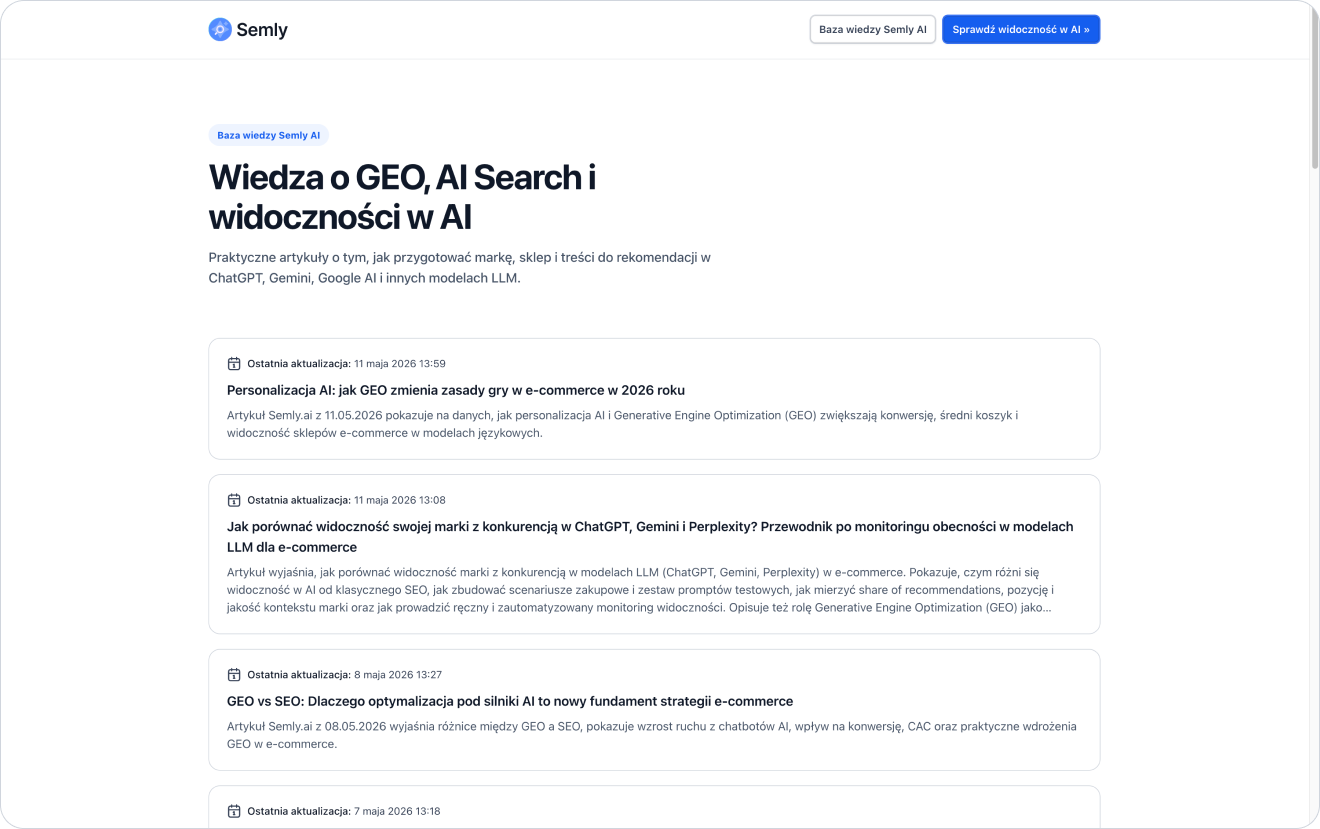
The Semly knowledge base is a public page with articles prepared based on an analysis of the brand’s visibility in AI.
Its goal is to organize information about the brand in a way that’s understandable for:
users
AI models
LLM bots
search engines
systems that analyze content
tools that use structured data
A knowledge base can include articles that answer customer questions, product explanations, guides, comparisons, FAQs, and content that supports specific prompts monitored in Semly.

The knowledge base can be launched on your subdomain, for example:
knowledge.yourdomain.comThis way, the content is tied to your brand and domain, but at the same time can work in a separate, technically optimized space.
This solution is useful when:
you don’t have easy access to the CMS
publishing on the blog requires a developer’s work
you want to separate AI content from the main blog
you want to publish articles generated in Semly faster
you want to keep a consistent content structure
you want to have a ready-made knowledge layer optimized for LLM bots
you don’t want to interfere with the current template or website technology

The knowledge base is hosted on Semly’s servers. This means you don’t have to build a publishing system yourself, implement a template, create the technical structure, or configure data for AI models from scratch.
Semly takes care of the technical layer of the knowledge base, including:
content hosting
article structure
automatic sitemap
llms.txt file
structured data
AI-friendly content formats
public access to content
optimization for LLM bots
API
public MCP for LLM bots
Thanks to this, the client can focus on content quality, correctness of information, and linking to their own products or services.
Once the knowledge base is configured, Semly automatically prepares technical elements that help organize the content and make it available to AI systems.
Automatically generated include, among others:
XML sitemap
llms.txt file
structured data
article structure
links to content
content versions in AI-friendly formats
JSON-LD data
content in Markdown
public article URLs
structure available for LLM bots
The llms.txt file is a simple text file that helps AI systems understand what a given site is and where its most important resources are located.
In the Semly knowledge base, the llms.txt file can point to, among other things:
a description of the knowledge base
a list of the most important articles
a link to the sitemap
key resources for AI models
brand information
the language and context of the content
Thanks to this, LLM bots can more quickly identify that the knowledge base is a place with organized information about the brand.
The Semly knowledge base is built with AI models and content-analyzing systems in mind.
Articles can be shared in formats such as:
HTML
Markdown
JSON-LD
structured data
API
public MCP
Structured data helps better describe the type of content, its topic, context, and relationships between elements.
Markdown is easy for AI systems to read and process.
JSON-LD lets you pass data in an organized form that’s useful for systems analyzing the structure of the content.
The Semly knowledge base can also share content via open API and public MCP.
This way, AI systems and LLM bots can access structured data in a more technical and predictable way than by classic page browsing.
This can make it easier to:
read the list of articles
fetch content in a structured format
analyze brand knowledge
access data in Markdown or JSON-LD
let AI systems use the knowledge base
interpret relationships between articles and topics
To run a knowledge base on your own subdomain, you need to add the right DNS record.
Example subdomain:
knowledge.yourdomain.comBasic steps:
Go to the knowledge base configuration in Semly
Enter the subdomain name, e.g. knowledge
Copy the DNS record value shown in the panel
Log in to the DNS panel of your domain
Add the required record for the subdomain
Save the changes
Go back to Semly
Click Verify and activate
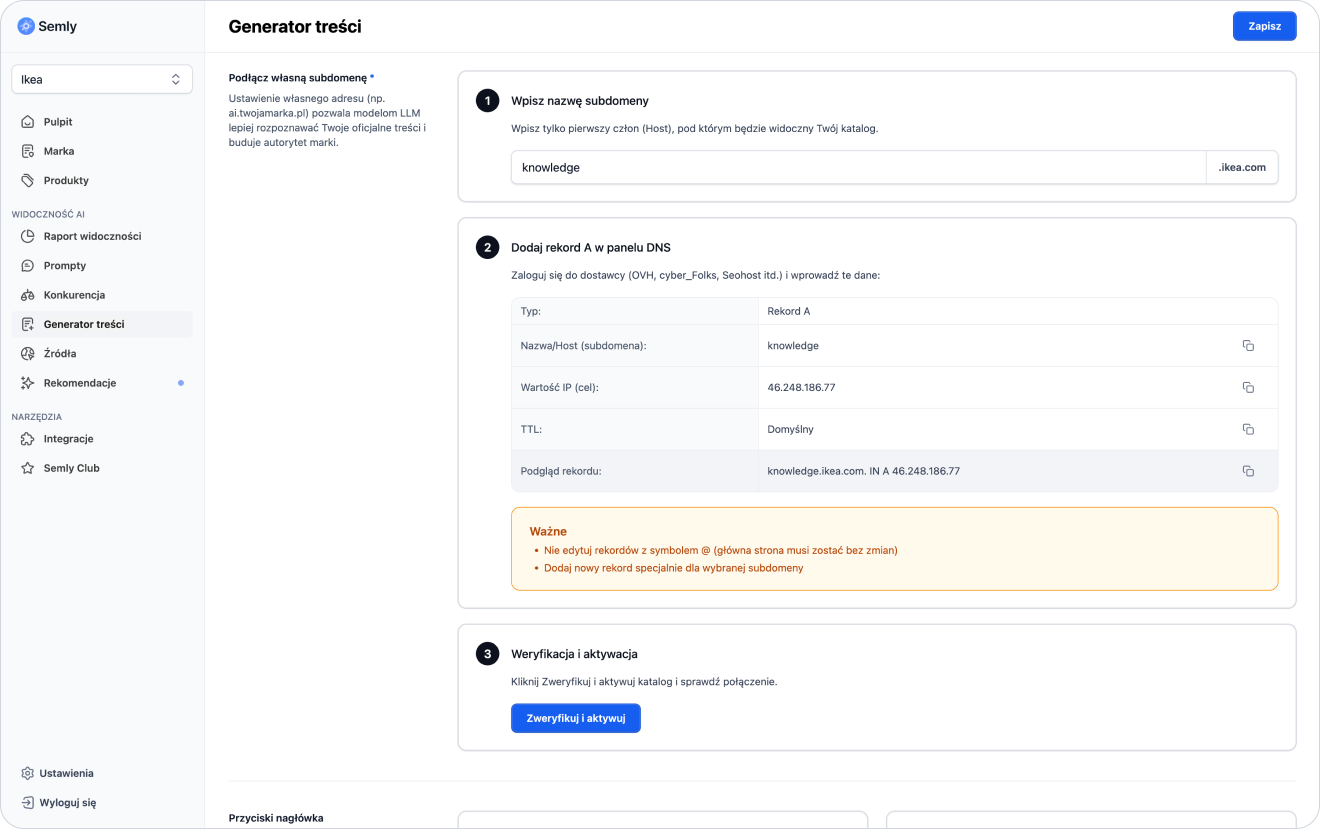

If your domain is:
yourdomain.comyou can create a subdomain:
knowledge.yourdomain.comIn the DNS panel, you add a record for the subdomain itself knowledge, not for the entire domain.
Example:
Type: A
Name: knowledge
Value: IP address provided in the Semly panel
After saving the changes, DNS may need some time to propagate. Usually it takes from a few minutes to a few hours, depending on the domain provider.
In the knowledge base you can set up buttons that help the user get to the most important places.
Most often, two buttons are used:
a button leading to the knowledge base home page
a button leading to the client’s landing page
Example:
Knowledge base leads to the knowledge base home page
Go to store leads to the store’s home page or a selected landing page
You can adjust the button texts to match your own communication style.
Example button texts:
Go back to the knowledge base
Go to store
See offer
Check products
Contact us
Visit page
See services
The knowledge base lets the customer adjust selected elements of the page by adding their own HTML code.
You can add HTML, among other places:
in the article list
in the footer
above the content of all articles
This way you can add extra information, links, messages, navigation elements, or simple promo blocks.
Example uses:
information about the brand
link to the store
link to the contact form
additional CTA
short offer description
link to the main page
information about help
section with the most important categories
Articles in the knowledge base should include links to the client’s most important pages.
Internal linking helps the user move from educational content to a specific product, service, category, or contact form.
In articles, it’s worth linking to:
home page
category pages
product pages
service pages
contact form
guides
FAQ
delivery policy
returns policy
comparison pages
Example:
The article answers the question:
Where to buy a storage bed for a small bedroom?
It’s worth adding links to:
category of beds with storage
selected products
guide to choosing a bed
page with delivery information
Articles published in the knowledge base should be unique.
You shouldn’t copy 1:1 content that’s already published on the blog, category page or other subpages. This can lead to a duplicate content problem, meaning the same content is repeated in many places.
Instead of copying existing content:
prepare a new article for a specific prompt
describe the topic from a different perspective
add more purchase-related context
answer specific customer questions
link to existing pages instead of copying their content
update articles based on recommendations
avoid repeating the same paragraphs

The knowledge base is public. This means that both LLM bots and regular users can use it.
That’s why the content should be:
useful
understandable
up to date
factually correct
unique
well linked
aligned with the offer
written in natural language
readable for humans
organized for AI systems
Once you launch the knowledge base, it’s a good idea to add a link to it from the client’s main page.
The most common places for the link:
page footer
menu
help section
blog
knowledge center
contact page
FAQ page
HTML sitemap
The simplest solution is to add a link in the footer, for example:
Baza wiedzyleading to:
https://knowledge.yourdomain.comThis way, users and bots can find the knowledge base more easily.
Apart from the link in the footer, it’s worth adding the knowledge base to the main XML sitemap.
Thanks to this, systems analyzing the site can detect faster that the knowledge base is part of the brand’s ecosystem.
In the main sitemap you can add the address:
https://knowledge.yourdomain.comor a reference to the knowledge base sitemap, if it’s available.
After configuration, check a few basic elements.
Checklist:
the subdomain opens in the browser
the knowledge base homepage works
articles are publicly available
buttons lead to the correct addresses
links in articles work
the sitemap is available
the llms.txt file is available
the content isn’t a copy of existing articles
the knowledge base is linked from the main page
the knowledge base has been added to the XML sitemap
custom HTML doesn’t break the page layout
articles include links to products or services
The most common mistakes are:
no link to the knowledge base from the main page
not adding the knowledge base to the XML sitemap
copying blog content 1:1
no links to products or services
incorrect DNS configuration
changing the main domain record instead of the subdomain
outdated content
buttons leading to the wrong places
custom HTML with errors
publishing articles without checking them
treating the knowledge base only as a page for bots
After launching the knowledge base, do a few extra things.
Check:
if DNS was configured correctly
if Semly confirmed the activation of the subdomain
if the knowledge base homepage works
if the generated articles are visible
if the sitemap works correctly
if llms.txt works correctly
if the buttons lead to the right pages
if the knowledge base is linked from the homepage
if the knowledge base was added to the XML sitemap
if the articles contain links to products or services
Then keep an eye on:
visibility of prompts related to articles
AI answer sources
brand position
sentiment
Semly recommendations
competitor mentions
How to generate your first article
How to read Semly recommendations
What AI answer sources are
How to create prompts and topics
How to analyze prompt details
How to add products or a Google Shopping XML file
A knowledge base on a subdomain lets you quickly publish organized content about the brand, products, and services without rebuilding the main site.
Key benefits:
runs on Semly infrastructure
is optimized for LLM bots
automatically generates a sitemap
automatically generates llms.txt
supports structured data
shares content in HTML, Markdown, and JSON-LD
can expose public API and MCP
lets you publish unique articles
makes it possible to link to a landing page
lets you edit buttons and add your own HTML
is available to users and AI systems