Recommendations in Semly are ready-made action suggestions prepared based on the analysis of your brand, prompts, sources, competitors, AI model responses, and project configuration.
Their goal is to show what’s worth improving, adding, or implementing to increase the chances of your brand appearing in AI answers.
What’s important is that Semly doesn’t just show a general suggestion. In many cases you get a ready-made solution that you can implement automatically in Semly, or copy and paste into the right place on your website or in your technical configuration.
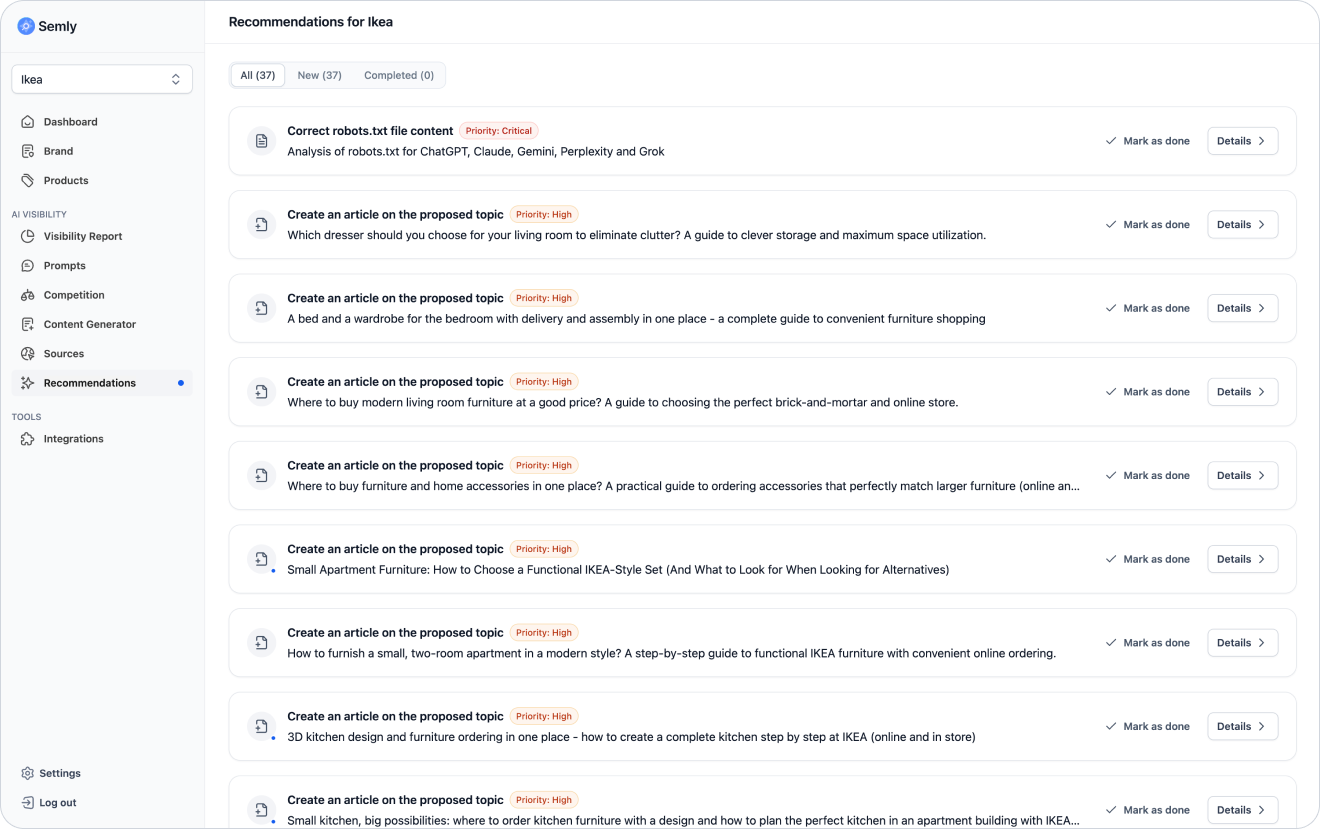
Recommendations are specific tasks that help improve your brand’s visibility in AI.
They can refer to, among other things:
technical configuration of the website or online store
robots.txt file
llms.txt file
sitemap
brand data
product data
content on the site
knowledge base
sources
prompts
competitors
Each recommendation points out a problem or opportunity and shows what action is worth taking.

The report itself shows what’s happening with your brand’s visibility. The recommendations show what you can do about it.
Thanks to the recommendations, you can:
improve your site’s accessibility for AI bots
organize your brand data
fill in missing information
create content for important customer questions
expand your knowledge base
improve product data
increase your chances of being recommended in AI
reduce gaps compared to your competitors
react faster to technical issues

To go to the recommendations:
Log in to the Semly panel
Choose the right project
Go to the Recommendations section
Check the task list
Open the details of the selected recommendation
Perform the action automatically or copy the ready-made solution
In the Recommendations section you can see among other things:
recommendation title
description of the problem or opportunity
priority
status
action details
ready-made solution
action execution button if available
manual implementation instructions
Semly can generate different types of recommendations, depending on the data detected in the project.
The most common types of recommendations are:
technical
content-related
product-related
brand-related
source-related
prompt-related
competitors-related
knowledge-base-related
These concern elements that can affect data availability for AI models.
Examples:
fix the robots.txt file
add or update the llms.txt file
fix or add a sitemap
add a link to the knowledge base
make sure AI bots can read the important pages
fix or add schema.org structured data
These are about articles, descriptions, FAQs and content that answers customer questions.
Examples:
create an article on the given topic
expand the content for a specific prompt
add an answer to a frequently asked question
prepare a comparison guide
describe the brand’s advantages in a given category
create a knowledge base for selected topic gaps
They concern the quality of product data and how well the offer matches customer questions.
Examples:
improve product descriptions
fill in missing categories
add better product names
check product availability
update the Google Shopping XML file
They concern the places that AI can use when creating answers.
Examples:
check the source that supports the competitors
make sure you’re present in an important directory
prepare content similar to a source often used by AI
analyze the ranking where the competitors appears
In Semly, some recommendations can be done automatically, and some require manual implementation outside the panel.
You can do some actions directly in Semly.
This can apply, for example, to:
generating an article
preparing content in the Content Generator
creating content in the knowledge base
marking the recommendation as completed
preparing a ready-made file or a piece of content
running AI Agents actions available in the panel
If a recommendation can be done automatically, you’ll see the right button or action in its details.
Example:
Create content
Mark as done
Copy the ready-made solution
Some recommendations require copying the ready-made solution and pasting it in the right place outside Semly.
This may apply for example to:
the robots.txt file
the llms.txt file
the sitemap
DNS settings
a link in the page footer
a link in the menu
changes in the CMS
changes in the shop panel
updating the content on the site
Example:
Semly can prepare the ready content of the llms.txt file, but you or a tech person have to paste it on the site in the right place.

Priority helps you decide where to start.
In Semly you can see recommendations with different levels of importance.
Most often:
critical
high
medium
low
Means an action that can block or significantly limit the analysis and visibility of the brand in AI.
Examples:
AI bots have limited access to the site
the robots.txt file blocks important resources
a key sitemap is missing
important data isn’t available
the setup makes the site hard to read
It’s worth doing these recommendations first.
Means an action that can have a big impact on the brand’s visibility.
Examples:
creating content for an important prompt
improving product data
expanding the knowledge base
improving the brand description
filling in important sources
Means an action that is important, but usually doesn’t block the basic analysis.
Examples:
polishing the content
expanding the FAQ
improving a less important category
filling in additional data
Means a supporting or optimization task.
Examples:
small content tweaks
additional data expansion
tidying up less important elements
When you open a recommendation, you’ll see more info about why Semly suggests a given action.
The details can include:
a description of the problem
an explanation of the impact on visibility
a ready-made solution to copy
a button to run an automatic action
instructions for manual implementation
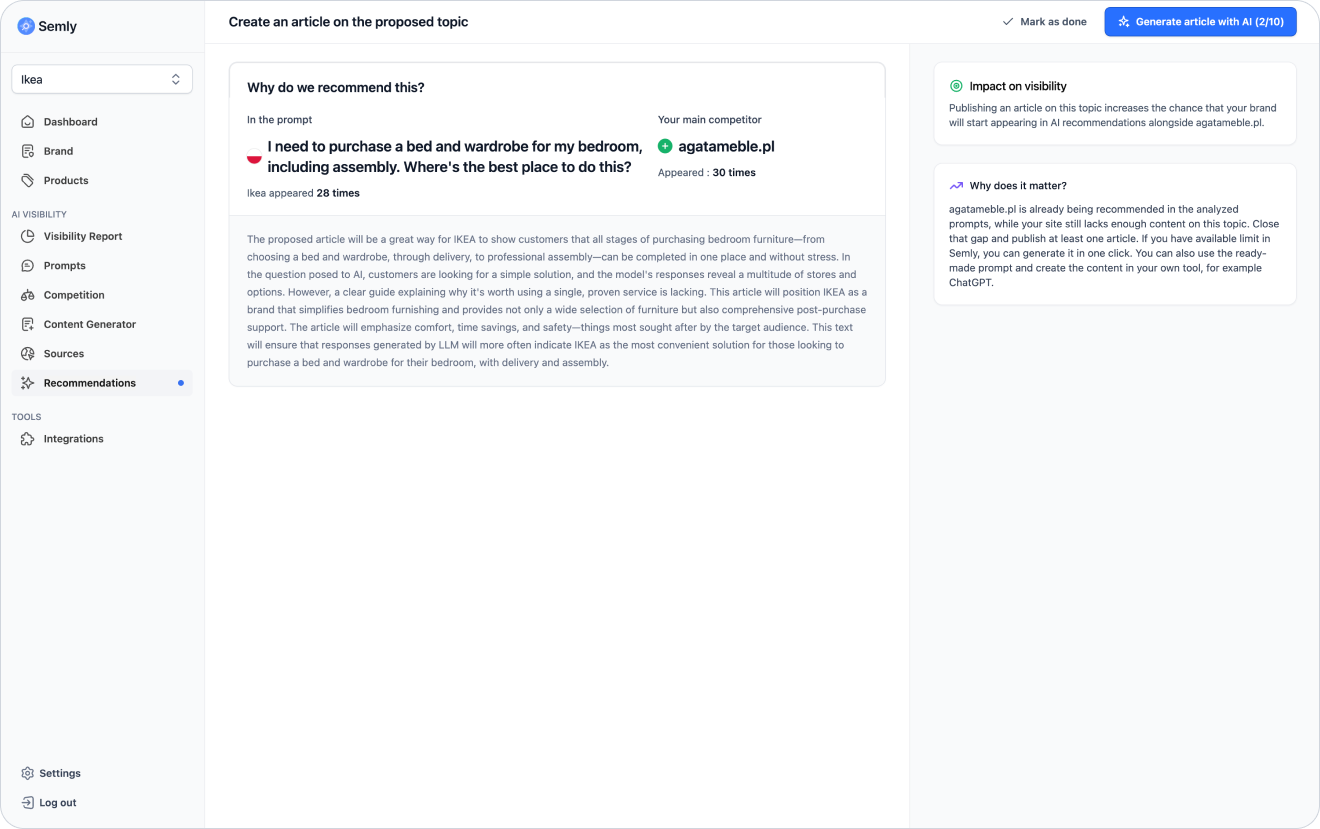
In many recommendations, Semly prepares a ready-made solution that you can use right away.
For example, this could be:
ready article content
ready file llms.txt
ready sitemap
ready robots.txt file
ready brand description
ready list of recommendations
ready content to paste on the website
ready FAQ structure
ready suggestions for product descriptions
If the recommendation contains a ready-made solution:
Open the recommendation details
Read the description of how it works
Check the ready-made content or configuration
Copy the prepared solution
Paste it in the right place
Save the changes in your system
Go back to Semly and mark the recommendation as completed if that option is available
If Semly detects that the robots.txt configuration may make it harder for AI bots to access important website resources, it can prepare a technical recommendation.
In such a recommendation you might see:
problem description
an explanation of why robots.txt matters
the entire proposed file content ready to use
instructions on where to paste the change
info on what to check after deployment
Example action:
Copy the ready-made content prepared by Semly
Open the robots.txt file of your site
Paste the copied content
Save the file
Check if the file is available at https://yourdomain.com/robots.txt
Mark the recommendation as done or run the test by clicking Check again
The llms.txt file is a simple text file placed in the root directory of the domain that helps AI systems understand what the site does and which resources are the most important. It can include a short brand description, links to key sections, sitemaps, knowledge bases, and other materials that are worth sharing with AI models.
If Semly generates a recommendation regarding llms.txt, you can get a ready-made file content.
In such a recommendation you might see:
a ready description of the site
links to the most important sections
information about the language and market
instructions for publishing the file
Example workflow:
Copy the ready-made llms.txt content
Create a file llms.txt in the main directory of the domain
Paste the content prepared by Semly
Save the file
Check if it works at https://yourdomain.com/llms.txt
Mark the recommendation as done
If Semly detects a prompt where the competitors is visible and your brand doesn't appear in the answers, it can suggest creating content.
The recommendation can indicate:
article topic
prompt the gap refers to
competitor that appears more often
reason for preparing the content
potential impact on visibility
option to generate an article in Semly
Example workflow:
Open the recommendation
Check the prompt and the reasoning
Click the option to generate an article if it’s available
Review the generated content
Edit it if needed
Publish the content in the knowledge base or on the website
Monitor visibility changes in the next reports
After implementing a recommendation, it’s a good idea to mark it as completed if the panel offers such an option.
This helps organize your work and separate finished tasks from those that still need action.
Marking a recommendation as completed helps you:
track progress
avoid repeating the same actions
keep your task list tidy
come back later to analyze the results
manage your team’s work better
The impact of a recommendation doesn’t always show up right away. AI models and systems that use sources may need some time to take new data into account.
After implementing the recommendations, check:
brand visibility
position for the related prompt
sentiment of the responses
sources of the AI response
presence of competitors
change over time
new recommendations
It’s best to compare the results before and after implementation in the same area, e.g. for the same prompt, topic, or source.
Some recommendations require access to site files, DNS, CMS, or the store panel.
If you don’t have technical access, pass the ready-made solution to the person responsible for the site.
It’s worth passing on:
content of the recommendation
ready-made solution from Semly
implementation location
short description of the goal of the change
link to the help article
screenshot of the recommendation
Sample message to a technical person:
Hey, Semly generated a recommendation on how to improve the page’s visibility in AI. I’m sending the ready-to-use content for implementation in the attachment along with the place where it should be added. Please check it and implement it according to the instructions.
The most common mistakes are:
ignoring critical recommendations
doing only easy tasks without analyzing priority
copying content to the wrong place or to several places (Duplicate content)
marking a recommendation as done before implementation
not checking how it works after implementation
removing existing robots.txt rules without analysis
publishing content without reading and editing it
implementing many changes at once without monitoring the effect
skipping recommendations about sources
not comparing the results before and after implementation

robots.txt, sitemap or llms.txt, make sure you understand where to add it or pass it to a technical person.It’s best to treat recommendations as a current list of actions that improve your brand’s visibility in AI.
A good work rhythm can look like this:
once a week, check new recommendations
start with critical and high priority
carry out the most important technical actions
pick 1 to 3 content-related recommendations
generate or prepare the content
mark completed tasks
check the results after a few days or weeks
compare the change in visibility in the report
What are AI answer sources
Learn what sources are in Semly and why they matter a lot for your brand’s visibility in AI answers.
How to analyze prompt details
Learn how to read prompt details in Semly and check why your brand appears or doesn’t appear in AI answers.
How to interpret AI model answers
Learn how to analyze real answers from AI models in Semly and check if your brand is correctly described, recommended, and understood by artificial intelligence.
How to generate your first article
Learn how to generate your first article in Semly and use it to build your brand’s visibility in AI answers.
How to set up a knowledge base on a subdomain
Learn how to launch a Semly knowledge base on your own subdomain and why it matters for your brand’s visibility in AI answers.
Semly recommendations show specific actions that can help improve your brand’s visibility in AI answers.
The most important rules:
start with the highest-priority recommendations
check the details and justification of the recommendations
use ready-made solutions prepared by Semly
carry out some actions automatically in the panel
copy some actions and implement them manually on the site or in the configuration
once implemented, mark the task as done
monitor the results in the visibility report
don’t ignore technical recommendations