The Semly knowledge base is a separate space with articles that help AI models better understand your brand, products, services, advantages, and answers to customer questions.
It can run under your own subdomain, for example:
knowledge.yourdomain.comThis way, the content is publicly available to users and LLM bots, and at the same time optimized for the way AI models analyze websites.
You can see an example knowledge base here:
https://knowledge.semly.ai/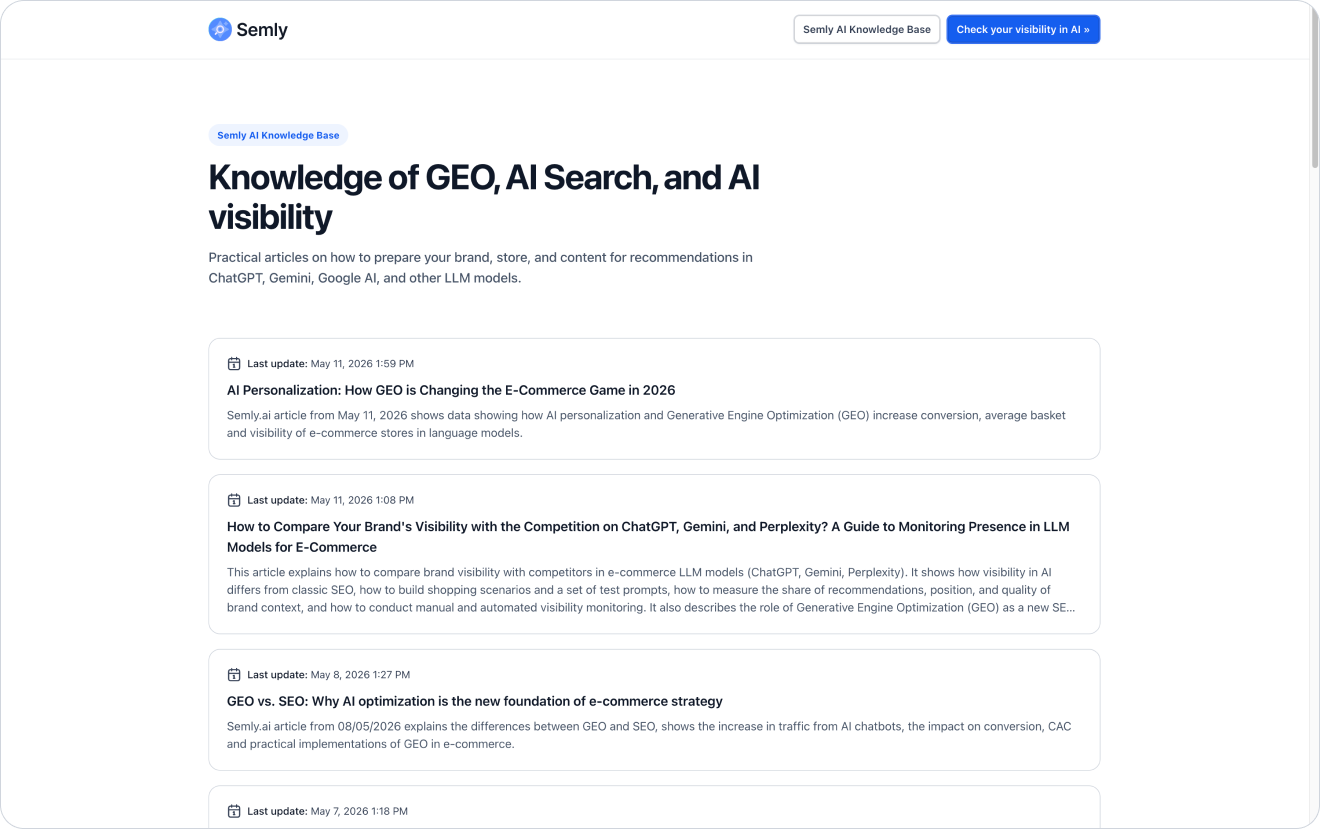
The Semly knowledge base is a public page with articles prepared based on an analysis of the brand’s visibility in AI.
Its goal is to organize information about the brand in a way that’s understandable for:
users
AI models
LLM bots
search engines
systems that analyze content
tools that use structured data
A knowledge base can contain articles answering customer questions, product explanations, guides, comparisons, FAQs, and content supporting specific prompts monitored in Semly.

The knowledge base can be launched on your subdomain, for example:
knowledge.yourdomain.comThis way, the content is tied to your brand and domain, but at the same time can operate in a separate, technically optimized space.
This solution is useful when:
you don’t have easy access to the CMS
publishing on the blog requires help from a developer or technical team
you want to separate AI content from the main blog
you want to publish articles generated in Semly faster
you want to keep a consistent content structure
you want to have a ready-made knowledge layer optimized for LLM bots
you don’t want to interfere with the current template or technology of the site

The knowledge base is hosted on Semly’s servers. This means you don’t have to build a publishing system yourself, implement a template, create the technical structure, or configure data for AI models from scratch.
Semly takes care of the technical layer of the knowledge base, including:
content hosting
article structure for LLMs
public access to the content
optimization for LLM bots
public API and MCP for LLM bots
Thanks to this, you can focus on content quality, accuracy of information, and linking to their own products or services.
After configuring the knowledge base, Semly automatically prepares the technical elements that help organize the content and make it available to AI systems.
Among the elements generated automatically are:
automatic XML sitemap
llms.txt file
structured data
internal links to the client’s website content
content versions in AI-friendly formats
JSON-LD data
content in Markdown
The llms.txt file is a simple text file that helps AI systems understand what a given page is and where its most important resources are located.
In the Semly knowledge base, the llms.txt file can point to, among other things:
knowledge base description
a list of the most important articles
a link to the sitemap
key resources for AI models
brand information
language and content context
Thanks to this, LLM bots can more quickly identify that the knowledge base is a place with organized information about the brand.
The Semly knowledge base is designed with AI models and content analysis systems in mind.
Articles can be shared in formats such as:
HTML
Markdown
JSON-LD
structured data
public API and MCP for LLM bots
Structured data helps better describe the type of content, its topic, context, and the relationships between elements.
Markdown is easy for AI systems to read and process.
JSON-LD lets you pass data in an organized form that’s useful for systems analyzing the structure of content.
The Semly knowledge base can also share content through an open API and public MCP.
Thanks to this, AI systems and LLM bots can access structured data in a more technical and predictable way than through classic website browsing.
This can make it easier to:
read the list of articles
fetch content in a structured format
analyze brand knowledge
access data in Markdown or JSON-LD
use the knowledge base in AI systems
interpret relationships between articles and topics
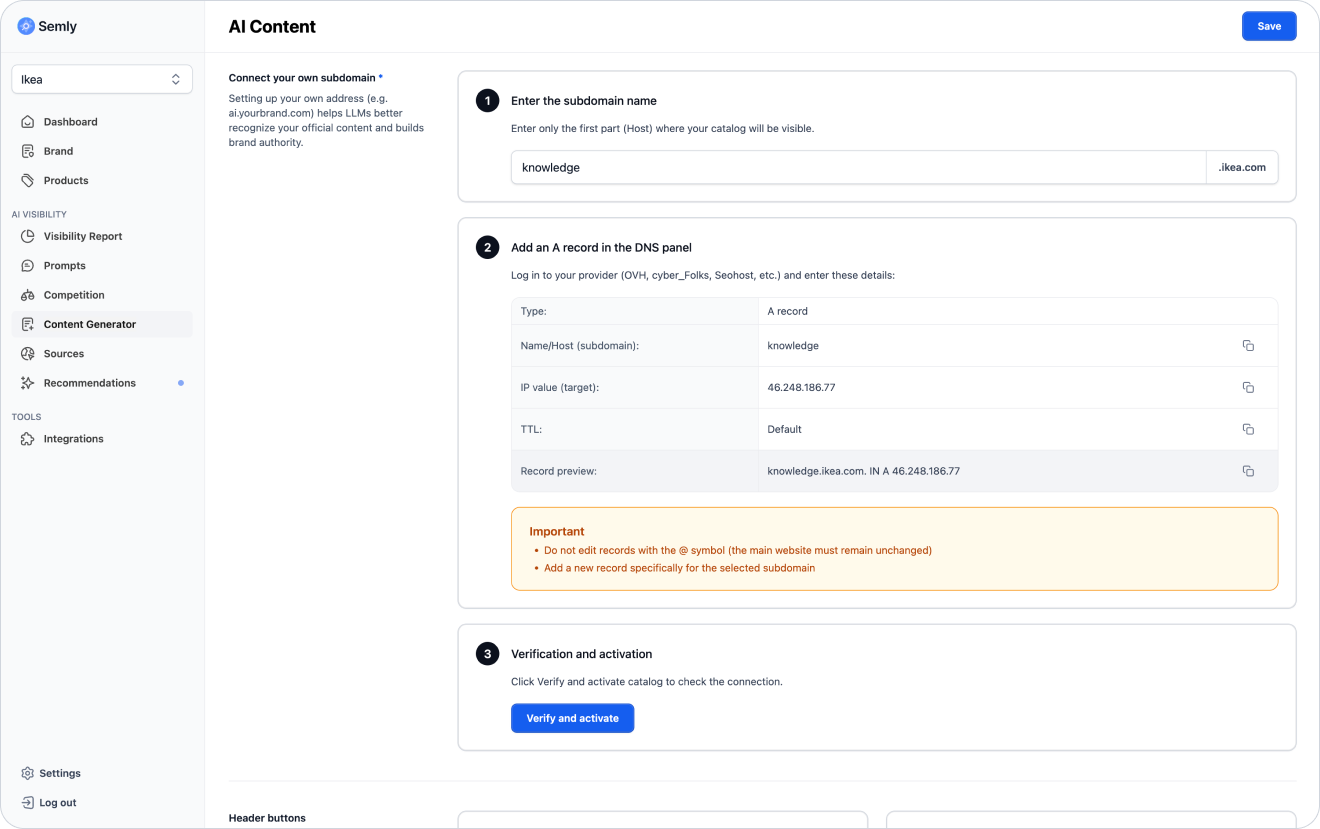
To run a knowledge base on your own subdomain, you need to add the right DNS record.
Example subdomain:
knowledge.yourdomain.comBasic steps:
Go to Knowledge base configuration in Semly
Enter the subdomain name, e.g. knowledge. You can also use another name, such as ai, llms, or help
Copy the DNS record value provided in the panel
Log in to the DNS panel of your domain
Add the required record for the subdomain
Save the changes
Go back to Semly
Click Verify and activate

If your domain is:
yourdomain.comyou can create a subdomain:
knowledge.yourdomain.comIn the DNS panel you add a record for the subdomain knowledge, not for the whole domain.
Example:
Type: A
Name: knowledge
Value: IP address provided in the Semly panelIn the knowledge base you can set up buttons that help the user get to the most important places.
Most often two buttons are used:
button leading to the main page of the knowledge base
button leading to the client’s website
Example:
Knowledge base leads to the main page of the knowledge base
Go to the store leads to the main page of the store or a selected client’s website
You can adjust the button texts to match your own communication.
Example button texts:
Go back to the knowledge base
Go to the store
See the offer
Check the products
Contact us
Visit the page
See services
The knowledge base lets the customer customize selected page elements by adding their own HTML code.
You can add HTML, among others:
in the article list
in the footer
above the content of all articles
Thanks to this, you can add extra information, links, messages, navigation elements, or simple promo blocks.
Examples of use:
brand information
link to the store
link to the contact form
additional CTA
short offer description
link to the main page
information about help
section with the most important categories
Articles in the Semly knowledge base can automatically link to valuable and related content on the client’s website.
Semly analyzes the topic of the article and the available pages on the site, and then detects places it’s worth sending the user to. Thanks to this, the article can lead from educational content to specific products, categories, services, or other important subpages.
Automatic linking can lead, among other things, to:
the homepage
category pages
product pages
service pages
the contact form
guides
FAQ
pages with shipping information
pages with returns information
comparison pages
Example:
If the article answers the question:
Where to buy a storage bed for a small bedroom?
Semly can automatically detect and add links to related pages, such as:
category of storage beds
selected products
a guide on choosing a bed
a page with delivery information
Articles published in the knowledge base should be unique.
You shouldn’t copy content 1:1 that’s already published on the blog, category page, or other subpages. This can lead to a duplicate content problem, meaning the same content is repeated in many places.
Instead of copying existing content:
create a new article based on a specific prompt
update articles based on recommendations

The knowledge base is public. This means that both LLM bots and regular users can use it.
That’s why the content should be:
useful
understandable
up to date
factually correct
unique
well linked
in line with the offer
written in natural language
readable for humans
structured for AI systems
Once you launch the knowledge base, it’s a good idea to add a link to it from the client’s main page.
The most common places for the link:
page footer
menu
help section
blog
knowledge center
contact page
FAQ page
HTML sitemap
The simplest solution is to add a link in the footer, for example:
Knowledge baseleading to:
https://knowledge.yourdomain.comThanks to this, users and bots will find the knowledge base more easily.
Besides the link in the footer, it’s worth adding the knowledge base to the main XML sitemap.
Thanks to this, systems analyzing the site can detect faster that the knowledge base is part of the brand’s ecosystem.
In the main sitemap you can add the address:
https://knowledge.yourdomain.comor a reference to the knowledge base sitemap, if it’s available.
After configuration, check a few basic elements.
Checklist:
the subdomain opens in the browser
the knowledge base home page works
articles are publicly available
buttons lead to the correct addresses
links in articles work
the sitemap is available
the llms.txt file is available
the content isn’t a copy of existing articles
the knowledge base is linked from the main website
the knowledge base has been added to the XML sitemap
custom HTML doesn’t break the page layout
The most common mistakes are:
no link to the knowledge base from the main page
not adding the knowledge base to the XML sitemap
copying content from the blog 1:1
wrong DNS configuration
changing the main domain record instead of the subdomain
buttons leading to wrong places
custom HTML with errors
publishing articles without checking them
After launching the knowledge base, do a few extra things.
Check:
whether DNS was configured correctly
whether Semly has confirmed the subdomain activation
whether the main page of the knowledge base works
whether the generated articles are visible
whether the buttons lead to the correct pages
whether the knowledge base is linked from the homepage
whether the knowledge base has been added to the XML sitemap on your website
Then monitor:
visibility of prompts related to articles
AI answer sources - the knowledge base should show up as a new citation source
brand position
sentiment
Semly recommendations
competitors’ appearances
How to generate your first article
Learn how to generate your first article in Semly and use it to build your brand’s visibility in AI answers.
How to read Semly recommendations
Learn how to use Semly recommendations and turn AI analysis results into concrete actions that improve brand visibility.
What AI answer sources are
Learn what sources are in Semly and why they matter so much for brand visibility in AI answers.
How to create prompts and topics
Learn what prompts are in Semly, how to create good questions for AI monitoring, and how to organize them into topics.
How to analyze prompt details
Learn how to read prompt details in Semly and check why your brand appears or doesn’t appear in AI responses.
A knowledge base on a subdomain lets you quickly publish organized content about your brand, products, and services without rebuilding the main site.
Main benefits:
runs on Semly infrastructure
is optimized for LLM bots
automatically generates a sitemap
automatically generates the llms.txt file
supports structured data
shares content in HTML, Markdown and JSON-LD
can expose a public API and MCP
lets you publish unique articles
lets you link to the client’s website
gives you the option to edit buttons and your own HTML
is available to users and AI systems