Learn how to add competitors in Semly and how to use competition analysis to check your brand’s visibility in AI answers.
Competition in Semly helps you understand which brands your company appears with in AI model answers. This way you can check whether AI recommends your brand more often, your competitors, or other companies in the same category.
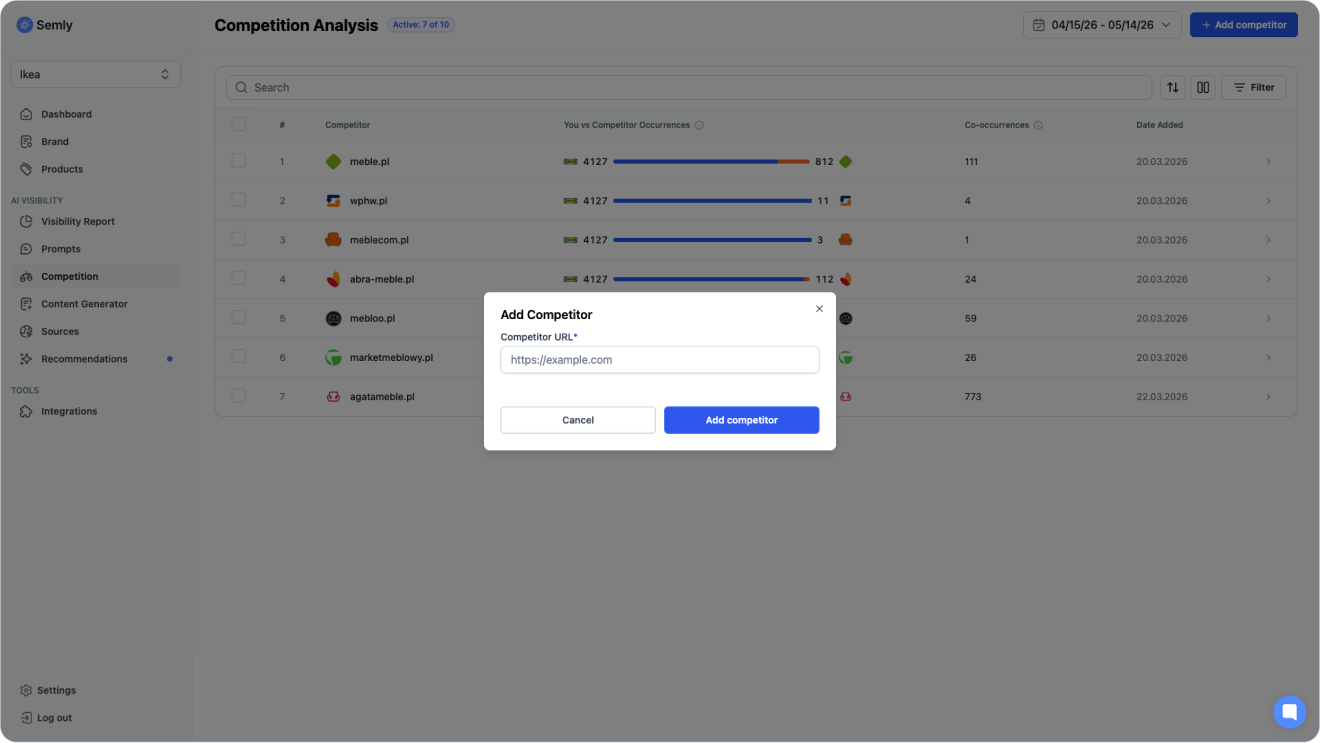
In Semly, you add a competitor using the URL of their main website. This way the system can clearly link the competitor to the correct domain.

AI models often answer users in the form of recommendations or comparisons. If a user asks about the best store, service, product, or platform, AI can point to several brands at the same time.
Example:
Which platform should I choose to run an online store?
or:
Which supplement store for athletes is worth choosing?
In these kinds of answers, what matters is not only whether your brand appears. It also matters whether it shows up higher than the competition, whether it’s described positively, and whether it appears with prompts that have high purchase intent.
Adding competitors lets you check:
which brands the AI recommends alongside your brand
which brands appear instead of your brand
for which prompts the competition has the upper hand
how often your brand appears together with competitors
where your brand has visibility gaps
whether your actions are improving your position versus the competition
To go to the competition analysis:
Log in to the Semly panel.
Go to the Competition section.
Check the list of added competitors.
Click a chosen competitor to see a detailed comparison.
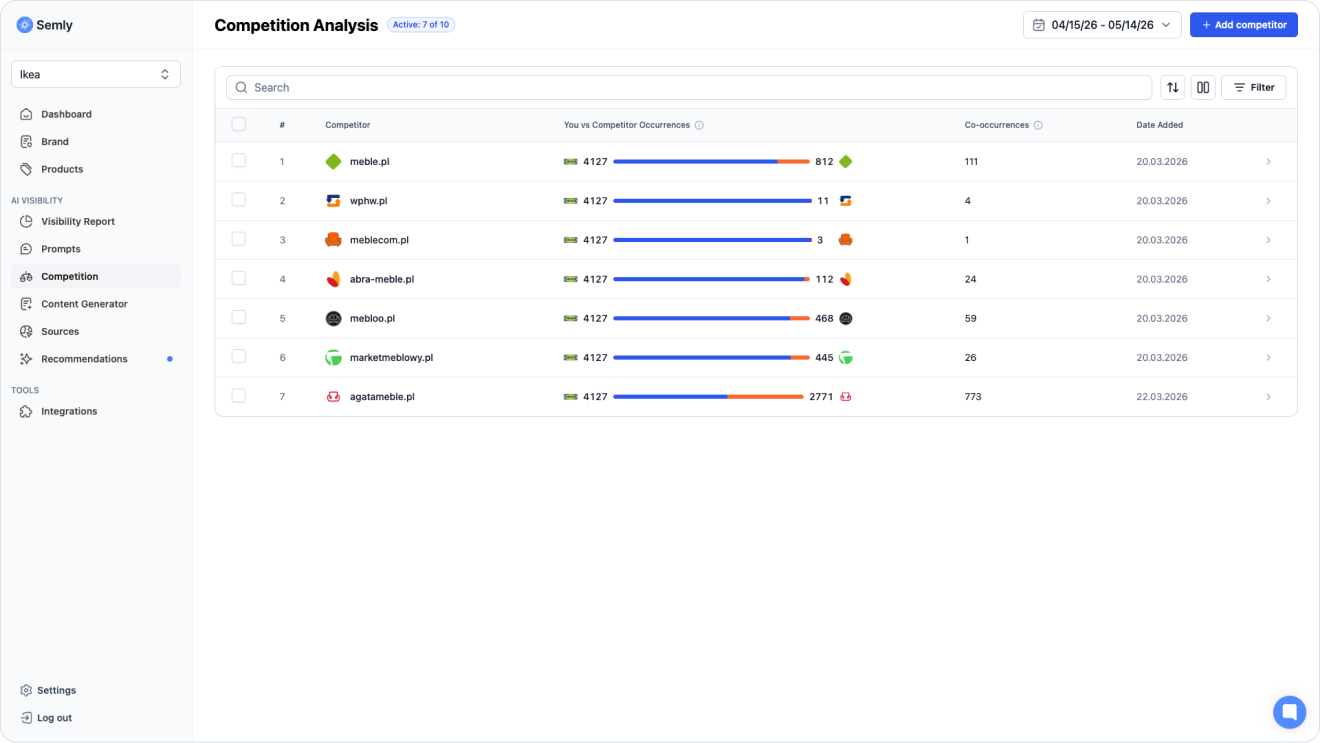
In the Competition section you’ll see, among other things:
competitor’s name
number of mentions of your brand
number of mentions of the competitor
number of shared mentions
date the competitor was added
button to go to details
To add a competitor:
Go to the Competition
Click Add competitor
Enter the URL of the competitor’s main page
Check if the address leads to the right brand
Save the competitor
It’s best to provide the competitor’s main domain, not a link to a single product, category, or article.
Examples:
Good:
https://ikea.com
https://shoptet.cz
https://sfd.pl
Bad:
https://ikea.com/us/en/p/specific-product
https://competitor-blog.com/article
You don’t have to add every company in the market. To start, pick a few competitors that matter the most for your analysis.
It’s worth adding:
direct competitors
category leaders
brands often compared to your company
companies visible in AI answers
marketplaces or platforms appearing in the same category
local competitors if you operate locally
premium brands if you want to compare positioning
budget brands if you compete on price
Example for a furniture store:
IKEA
Agata
Black Red White
Abra
Beliani
Example for an e-commerce platform:
Shopify
Shoptet
RedCart
WooCommerce
PrestaShop
Example for a supplements store:
SFD
Olimp Store
SportFuel
Muscle Power
GymBeam

At the beginning it's best to add a few of the most important competitors and expand the list over time.
Recommended start:
3 to 5 direct competitors
1 to 2 market leaders
1 to 2 brands detected in AI answers
1 marketplace or platform, if it shows up often in your category
It’s not worth starting with a very long list. Too many competitors can make the analysis harder and scatter your focus.
In Semly it’s worth telling apart two types of competitors.
These are companies you know from the market that offer similar products or services.
Example:
A furniture store monitors other online furniture stores.
These are brands that often show up in AI model answers, even if they weren’t obvious competitors before.
Example:
When asked about products in a given category, AI often recommends a marketplace, ranking site, or big platform instead of a classic online store.

In the competition section you can see a few important values.
Shows how many times your brand appeared in AI answers without the analyzed competitor being mentioned at the same time.
Shows how many times the analyzed competitor appeared in AI answers without your brand being mentioned at the same time.
They show how many times your brand and the competitor appeared in the same answer.
Example:
If your brand appears 20 times, the competitor 50 times, and the shared occurrences are 10, it means the competitor is more visible and in many answers appears independently of your brand.
When you click on a competitor, you’ll see a detailed comparison of their visibility with your brand.
In the details you can check:
visibility chart of both brands
the number of occurrences of your brand
the number of occurrences of the competitor
prompts where you both appear together
prompts where only your brand appears
prompts where only the competitor appears
the brand’s position in the answers
visibility for a specific prompt
sentiment
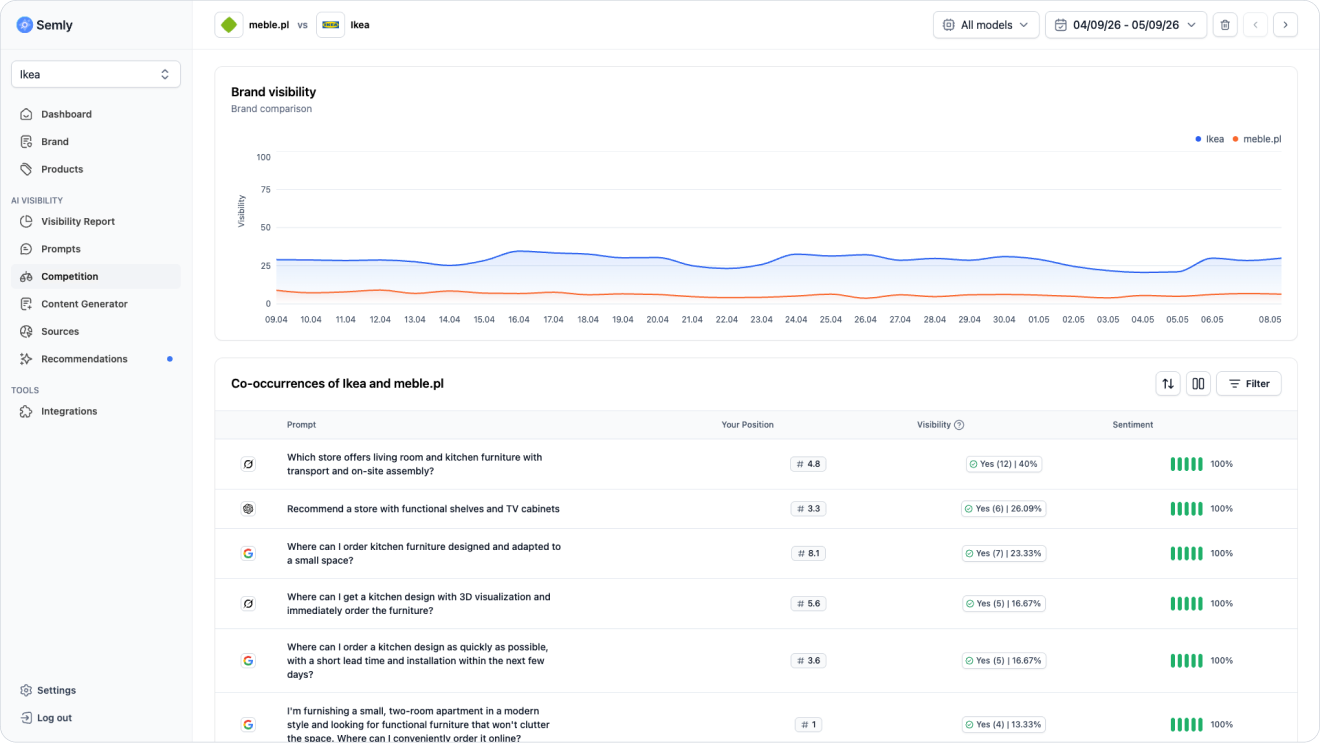
Shared prompts show the questions where the AI mentions both your brand and the competitor.
This is an important area because it shows where the AI understands you as alternatives for the same user problem.
Example:
Which platform should I choose to run an online store?
If your brand and a competitor show up in the answer to a question like this, it’s worth checking:
who appears higher
who has a better sentiment
who is described more specifically
what advantages does the AI point out
what sources the model uses
Prompts only for your brand show questions where your brand appears in AI answers, and the chosen competitor doesn’t show up.
This can mean an advantage in that area.
It’s worth checking:
why does AI point to your brand
does the answer have a positive sentiment
is your position high
what sources support this visibility
does this area have sales potential
Example:
If your brand shows up for purchase prompts and your competitor doesn’t, this might be a good area to further strengthen your content and sources.
Prompts only for the competitor show questions where the competitor appears in AI answers and your brand doesn’t show up.
This is one of the most important sections of competitor analysis because it shows visibility gaps.
It’s worth checking:
what questions give the competitor an advantage
are these purchase prompts
does the competitor have better sources
does your site answer that question
is it worth preparing new content
is there missing information in the brand profile
are the product data detailed enough
A visibility gap appears when a competitor shows up in AI answers for an important question and your brand isn’t mentioned.
To find such gaps:
Dig into the competitor’s details
Check the prompts where only the competitor appears
Choose prompts with high purchase intent
Check the sources used by the AI
Analyze the content of the model’s answer
Check if Semly generated recommendations for this area, and if not, generate 2–3 pieces of content for this topic
Actions can include:
improving brand data
completing product descriptions
creating a new article
expanding the knowledge base
improving the site structure
gaining presence in key sources
updating the product feed
adding new prompts
Just showing up in the answer isn’t enough. It also matters in which position the brand is mentioned.
Example of an AI answer:
Competitor A
Your brand
Competitor B
In this case your brand is visible, but it’s not the first recommendation.
It’s worth analyzing:
whether your brand appears before the competitor
whether the competitor appears before your brand
how often you’re in position #1
for which prompts the competitor wins the position
whether a high position is tied to positive sentiment
Sentiment shows what tone AI uses to describe the brand.
It can be:
positive
neutral
negative
When comparing sentiment with the competition, check:
whether AI describes your brand in a positive way
whether the competitor has better sentiment
what advantages AI points out for the competitor
whether your brand is described too vaguely
whether any limitations or gaps are mentioned
whether AI has enough data about your brand
Example:
If the competitor has similar visibility but better sentiment, the problem might not be the presence in AI itself, but the way the model describes your brand.
If the competition has greater visibility, start by analyzing the reasons.
Check:
for which prompts the competition wins
whether these are purchase prompts
what sources support the competition
whether your brand has complete data
whether the products are well described
whether the website answers these questions
whether you have content for the most important customer intents
whether Semly indicates recommendations to implement
Then take action:
improve your brand profile
fill in product data (online stores only)
generate content for prompts with a visibility gap using Content Generator in Semly
check competitor sources
expand your knowledge base
monitor position changes over time
It’s worth updating your competitors list regularly, especially when the market changes or when report results change.
Update competitors when:
a new competitor appears
you enter a new market
you add a new product category
you change your target group
AI often shows a brand you’re not monitoring
a competitor stops being relevant
you want to analyze a separate market segment
you see new brands in AI answers
After adding competitors, go to comparative analysis.
Check:
do competitors appear in AI answers
for which prompts do you appear together
where does only your brand show up
where does only the competitor show up
who has a better position
who has better sentiment
what sources support the competition
what recommendations does Semly suggest for visibility gaps
How to complete your brand profile
Learn how to correctly fill in your brand data in Semly so the system can better analyze your company's visibility in AI answers
How to create prompts and topics
Learn what prompts are in Semly, how to create good questions for AI monitoring, and how to organize them into topics.
How to read the Visibility report
Find out how to analyze the Visibility report in Semly and check how your brand appears in AI answers.
What AI answer sources are
Find out what sources are in Semly and why they matter a lot for your brand’s visibility in AI answers.
How to read Semly recommendations
Find out how to use Semly recommendations and turn AI analysis results into concrete actions that improve your brand’s visibility.
Adding competitors lets you check how your brand compares to other companies in AI answers.
Key rules:
add competitor URLs to their main pages e.g. https://ikea.com
start with a few most important competitors
analyze common prompts and prompts used only by the competitor
pay attention to position and sentiment
check the sources that support the competition
use visibility gaps to create content and implement recommendations