Content Generator in Semly helps create articles tailored to the questions users might ask AI models. The content is based on an analysis of brand visibility, prompts, competitors, and gaps detected in reports.
The articles are prepared by several dozen specialized Semly AI agents. The agents analyze the visibility of your brand and your competitors, check the strengths and weaknesses in AI answers, identify topics where it's worth strengthening the brand’s presence, and then prepare an article so that it supports better visibility in AI models.
Thanks to this, articles aren’t created randomly. Each piece has a specific goal: to fill gaps in AI’s knowledge, describe the brand better, answer real customer questions, and increase the chances that your company will appear more often in AI recommendations.
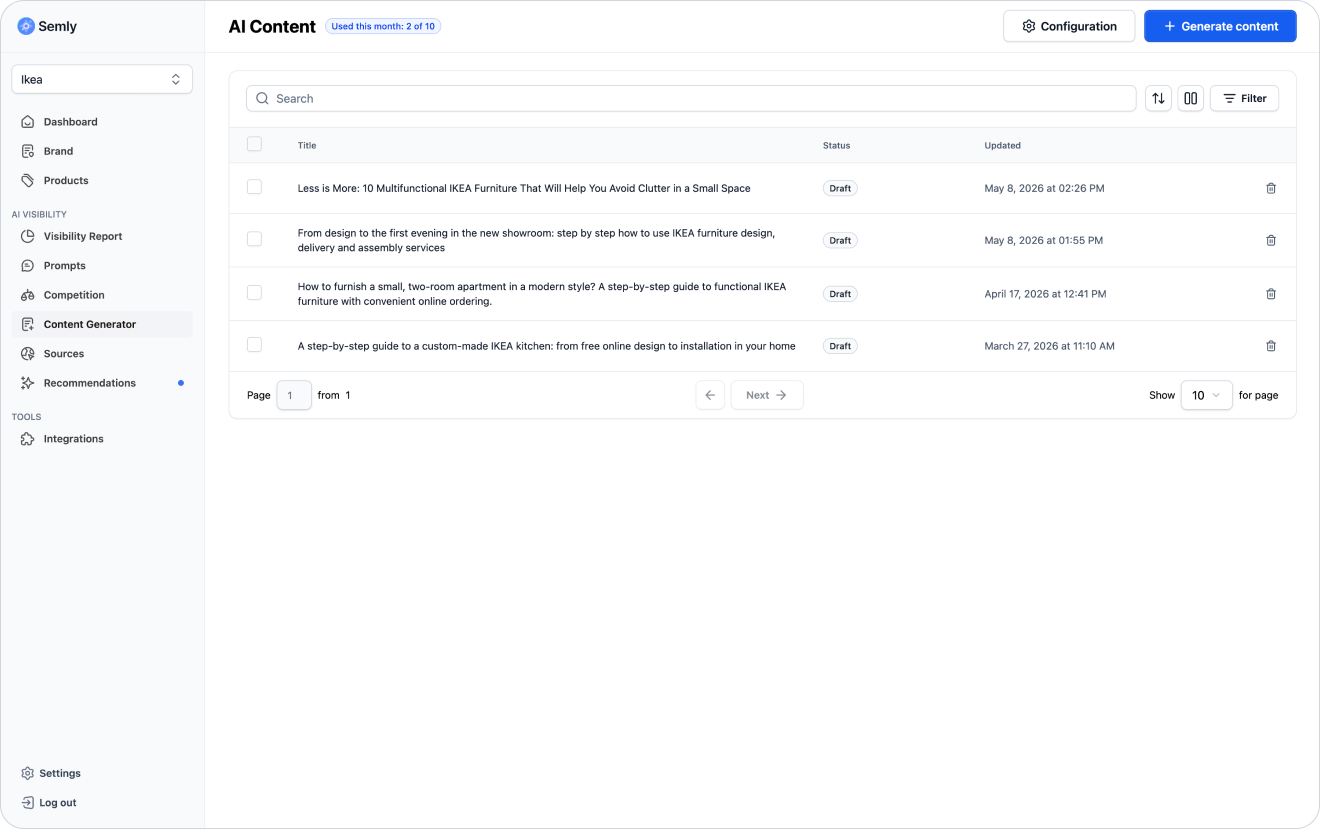
The Content Generator is a Semly tool that helps create articles that boost brand visibility in AI answers.
Its job is to turn data from reports into specific content. Semly analyzes prompts, visibility results, AI model responses, sources, and competitors, and then points out topics that are worth expanding.
This way you can create articles that answer real customer questions, fill in missing information about the brand, and better showcase its offer, products, services, and advantages.

Articles help you build an organized knowledge base about the brand, products, and services.
With them you can:
answer customer questions asked in AI
fill in visibility gaps compared to competitors
strengthen the brand’s expert image
describe products and services in a broader context
create content for specific prompts
develop the brand’s knowledge base
support linking to products and services
organize information that’s important for AI models
provide users with practical answers

Semly can use data from different parts of the panel to point out topics worth developing.
Among other things, it can take into account:
brand visibility in AI answers
prompts where the brand doesn’t appear
prompts where competitors show up more often
sources used by AI models
data from the visibility report
Semly’s recommendations
brand description
product data
categories of products or services
topics with high purchase potential
Thanks to this, articles are tied to real analysis results, not created only on the basis of generic keywords.
To go to the Content Generator:
Log in to the Semly panel
Go to the Content Generator
Check the list of articles
Choose an existing article or generate a new one
In this section you can see among other things:
article title
slug
meta description
article status (Published or Draft)
update date
article content
editing options
copying or publishing options
You can generate your first article from the Content Generator or directly from a recommendation if Semly points to a topic that needs to be developed.
If Semly shows a recommendation about creating content:
Go to the Recommendations section
Open the article-related recommendation
Check the prompt and the reasoning
Click the option to generate the article if it’s available
Wait for the content to be prepared
Go to the Content Generator
Open the ready article
Review and edit the material before publishing
This path is the best because the article is created based on a specific gap detected in the analysis.
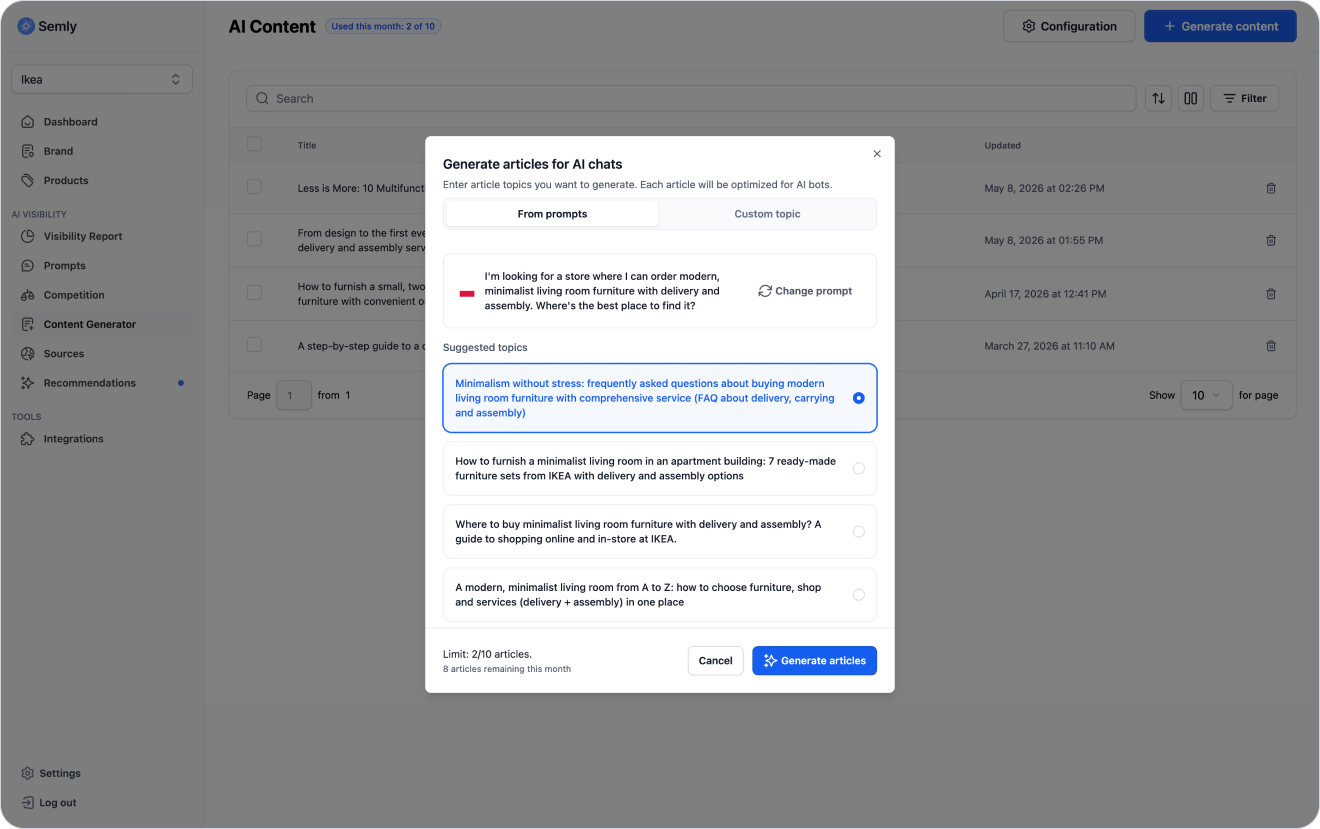
If you want to prepare an article manually:
Go to the Content Generator section
Click the option to create new content
Choose a prompt or enter your own article topic
Choose one of the suggested topics
Start generating
Open the finished article
Check the content and match it to your brand’s style
The generated article can include elements needed for publishing and further editing.
Most often you’ll find:
article title
slug
meta title
meta description
introduction
headings
main content
how‑to sections
answers to user questions
links to products or services
summary
a ready-to-publish version
You can edit the article later and adjust it to your brand’s tone of voice.
You can use ready-made articles in different formats, depending on how you publish them.
The most common formats are:
plain text
HTML
Markdown
This lets you publish the content on a website, blog, knowledge base, or CMS, or pass it to the person responsible for publication.
Additional solutions that make automatic publishing on selected platforms easier may also be in the works.
You can edit every article before publishing.
It’s worth checking:
whether the title is consistent with the topic
whether the content answers the user’s question
whether the brand description is accurate
whether the products or services are up to date
whether there is any information that doesn’t match the offer
whether the language fits the brand’s communication
whether the article includes concrete examples
whether the meta title and meta description are correct
whether the slug is easy to read

An important element of articles is internal linking. In Semly, links can be added automatically based on the content of the article and related pages available on the client’s website.
Semly analyzes the topic of the article and detects valuable places that are worth directing the user to. These can include products, categories, services, guides, offer pages, or other subpages related to the content of the article.
Thanks to this, the article isn’t just educational content. It can lead the user to specific places on the site that help them move from getting an answer to their question to a product, service, or contacting the company.
Semly can automatically link to:
products
product categories
services
offer pages
guides
FAQ
knowledge base
contact pages
delivery and payments pages
comparison pages
Example:
If the article answers the question:
Where to buy a bed with storage for a small bedroom?
Semly can automatically detect and add links to related pages, such as:
category of beds with storage
selected products
guide to choosing a bed
page with delivery information
The way you publish depends on your configuration.
You can:
copy the article and publish it on your blog
copy the article into the CMS
publish it as a how‑to page
use it in your knowledge base
publish it on a subdomain configured in Semly
hand the content over to a technical person or content manager
If you use the Semly knowledge base on a subdomain, publishing can happen automatically or with minimal user involvement, depending on the configuration.
Example subdomain:
knowledge.yourdomain.comA knowledge base on a subdomain is a separate space where articles prepared in Semly can be published.
Thanks to it, you can share organized content about the brand, products, services, and answers to customer questions without having to interfere with your current blog or main site structure.
Example:
knowledge.yourdomain.comThis model is useful when:
you don’t have easy access to the CMS
publishing on the site requires a developer’s work
you want to separate the knowledge base from the main blog
you want to quickly publish content that supports visibility in AI
you want to keep a consistent article structure
Articles help AI models better understand what the brand does and in which situations it can be recommended.
A well-prepared article can:
respond to a specific prompt
explain the user's problem
show the use of a product or service
highlight the brand's advantages
compare solutions
fill gaps in AI knowledge
strengthen the brand's expert context
link to products and services
support the sources used in the analysis
Content created in Semly should be up to date, because AI models interpret pages better when they contain fresh and factually accurate information. If an article needs an update, Semly can generate a recommendation to refresh the content.
Such a recommendation may appear when:
the offer changes
the products change
new prompts appear
the competitors gains visibility
new sources appear
the article contains outdated information
the content needs clarification
the data in the article no longer reflects the brand’s current situation
recommendations indicate a need for improvement
If the article was published outside the Semly knowledge base, e.g. on a blog or in the client’s CMS, the user will get a recommendation to refresh the article and will be able to prepare its new version in the Content Generator.
If the article is in the Semly knowledge base, the update can be done automatically. This way the content stays consistent, up to date, and better adapted to how AI models analyze information about the brand.
Before publishing, read the article like a potential customer.
Check:
whether the article answers the question from the title
whether the first paragraphs clearly explain what the text is about
whether the content is specific
whether the brand appears in a natural context
whether the products or services are described correctly
whether the article contains practical information
whether there are links to important products or services
whether the meta title and meta description are ready
whether the slug is correct
whether the content matches the brand style
After publishing, it’s worth checking whether the content is accessible and correctly linked.
Check:
whether the article opens publicly
whether the links work
whether the article is added to the knowledge base or blog
whether it can be found in sitemap.xml
whether it’s linked from the right place on the site
whether it doesn’t contain formatting errors
whether the recommendation has been marked as done
whether the visibility for the related prompt changes over time
Then monitor the results in Semly.
Pay attention to:
prompt visibility
brand position
sentiment
AI answer sources
competitor mentions
new recommendations
How to read Semly recommendations
Learn how to use Semly recommendations and turn AI analysis results into concrete actions that improve your brand visibility.
How to set up a knowledge base on a subdomain
Learn how to launch the Semly knowledge base on your own subdomain and why it matters for your brand visibility in AI answers.
How to analyze prompt details
Learn how to read prompt details in Semly and check why your brand does or doesn’t show up in AI answers.
What are AI answer sources
Learn what sources are in Semly and why they matter a lot for brand visibility in AI answers.
How to create prompts and topics
Learn what prompts are in Semly, how to create good questions for AI monitoring, and how to organize them into topics.
The Content Generator in Semly helps you prepare articles that answer customer questions and fill the gaps detected in AI visibility analysis.
Key rules:
start with articles related to recommendations
create content for specific prompts and user needs
check the article before publishing
add links to products and services
use meta title, meta description and slug
publish content on your website, blog, or in the knowledge base
update content when the offer or recommendations change
monitor the article’s impact on your brand’s visibility in AI