AI model answers show what a user might see after asking a specific question in a tool like ChatGPT, Gemini, Claude, Grok or Google AI Overviews.
This is one of the most important parts of analysis in Semly, because metrics alone show the result, but only the answer content explains the context: why the brand was recommended, how it was described, and what sources might have influenced the answer.
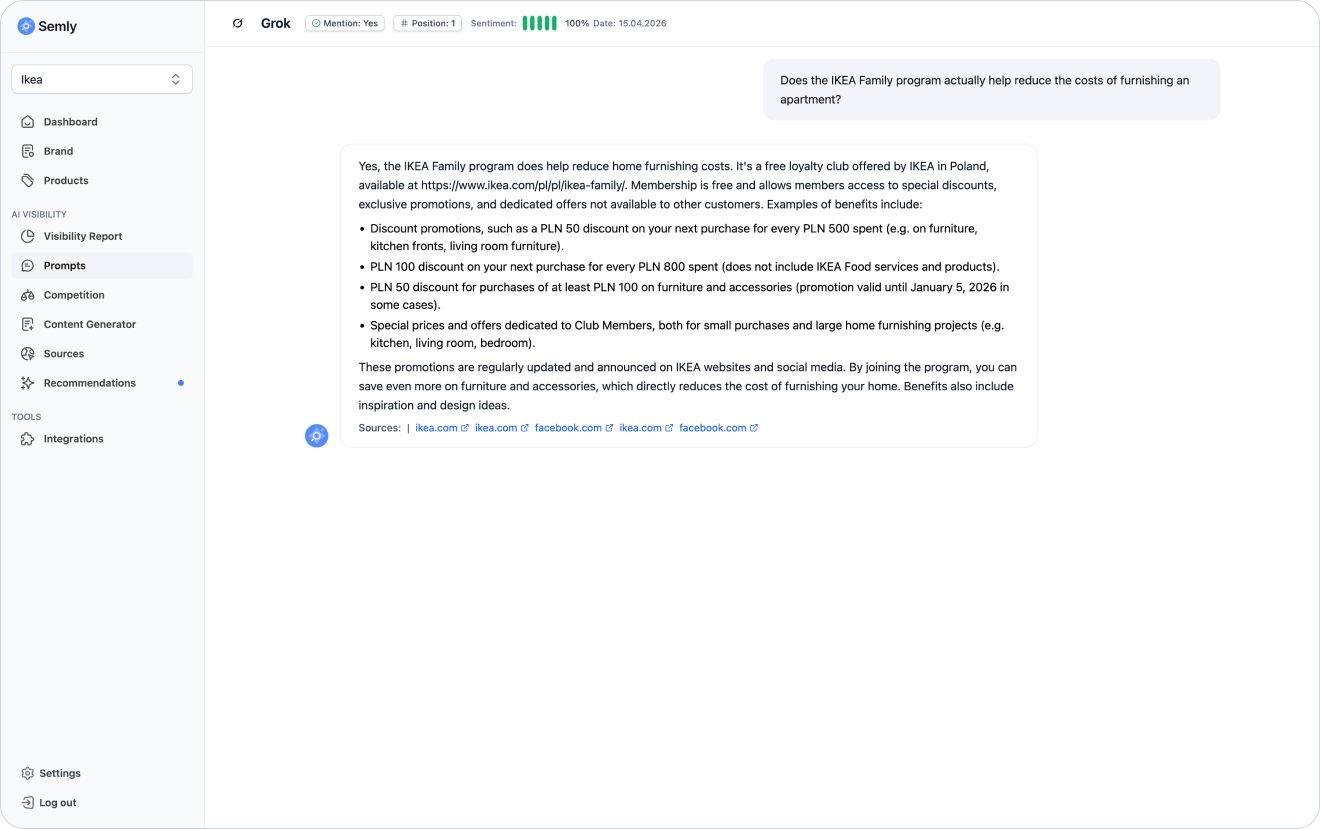
Metrics like visibility, position or sentiment show the brand’s overall result. The AI model’s answer, on the other hand, shows what that result looks like in practice.
By analyzing answers you can check:
whether your brand was mentioned
whether the brand was recommended
whether the brand description is correct
whether AI understands the brand’s offer
whether AI points to the right products or services
whether competitors show up
whether the answer contains errors
whether the answer is up to date
whether the sentiment matches the content of the answer
whether the user could make a decision based on this answer

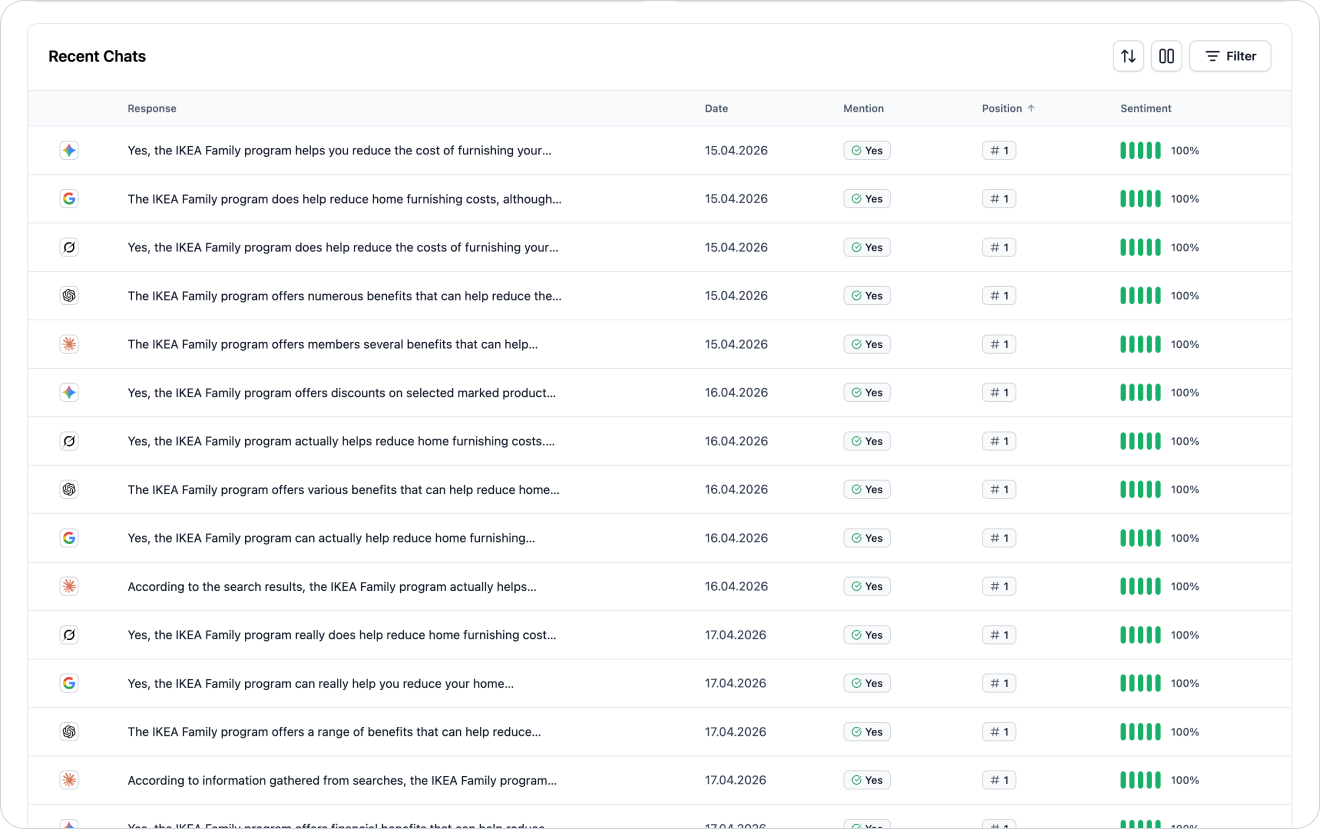
You’ll usually find AI model answers in the prompt details.
To check them:
Log in to the Semly panel.
Go to the Visibility report or Prompts section.
Click the selected prompt.
Go to the section with the latest answers from AI models.
Open the selected answer.
In this view you can see, among other things:
AI model name
date the answer was generated
content of the answer
information about the brand mention
brand position
sentiment
sources used in the answer
competitors appearing in the answer
After opening the answer, start with a few basic questions.
Check:
does the brand appear in the answer
is it just mentioned or actually recommended
in which position is it listed
how does the AI describe the brand
is the description accurate
does the AI point out specific advantages of the brand
do competitors show up
does the answer include sources
did the model avoid mixing up product or service categories
Not every mention means a recommendation.
An AI model can mention a brand in a few different ways.
AI mentions the brand, but doesn’t encourage the user to choose it.
Example:
There are brands like Brand A, Brand B, and Brand C operating on the market.
This means the brand is visible, but the answer doesn’t build a strong purchase intent.
AI points to the brand as a good solution for the user.
Example:
Brand B will be a good choice for people who are looking for a wide range of products, fast delivery, and items in the mid-price range.
This is a much stronger signal, because AI not only mentions the brand, but also explains why it’s a good choice.
AI compares the brand with other companies.
Example:
Brand A will work better for premium products, and Brand B for cheaper solutions for everyday use.
Such an answer can be valuable if it shows your brand in a favorable or appropriate context.

The position shows in what order the AI model lists brands, products, or solutions.
Example:
Brand A
Your brand
Brand C
In this case, your brand is visible in position #2.
#1 means that the brand is the first recommendation
#2 - #3 means good visibility, but not full dominance
#4 and lower means that the brand is visible, but might be less noticeable
no position means that the brand wasn’t detected in the answer
It’s worth analyzing the position together with the content of the answer.
A brand in position #2 with a very good description can be more valuable than a brand in position #1 described in a generic way.
Sentiment shows whether the AI model describes the brand positively, neutrally, or negatively.
AI points out the advantages of the brand, recommends it, or describes it as a good fit for the user’s needs.
Example:
The brand is a good choice for people looking for a wide range of products and fast delivery.
The AI mentions the brand but doesn’t clearly evaluate it.
Example:
The brand offers products in this category.
The AI points out limitations, lack of data, or reasons why the brand might not be the best choice.
Example:
There isn’t enough information to clearly recommend this brand.

AI answers can contain errors, simplifications, or outdated information. That’s why it’s worth checking whether the model is describing the brand correctly.
Pay attention to:
brand name
product or service category
market of operation
location
price level
main advantages
product availability
type of client
business model
delivery information
payment information
comparisons with the competition
Sample problems:
AI attributes to the brand products it doesn’t offer
AI confuses the brand with the competition
AI gives outdated information
AI describes the brand too generally
AI doesn’t understand the operating market
AI points to the wrong location
AI doesn’t see an important advantage of the brand

A good AI answer is specific, up to date, and matched to the user’s question.
A good answer should:
respond to the prompt’s intent
mention the brand in the right context
show specific advantages
explain who the brand is a good choice for
avoid incorrect information
don’t confuse the brand with competitors
include a logical justification for the recommendation
be consistent with the brand’s current offer
Example of a good answer:
Brand X can be a good choice for people looking for furniture for small apartments, because it offers beds with storage, compact wardrobes and living room shelves. It works especially well for customers who want to combine functionality with an affordable price.
This kind of answer is valuable because it shows the category, the need, the customer group and the reason for the recommendation.
A weak answer can be formally correct but not very useful for the user.
A weak answer often:
is too generic
doesn’t explain why the brand is recommended
doesn’t show the brand’s advantages
contains outdated information
skips important products or services
gets the category wrong
shows the brand at the end of the list
doesn’t respond to the question’s intent
is based on weak or random sources
Example of a weak answer:
Brand X offers various products and can be one of the options to consider.
Such an answer doesn’t build trust and doesn’t give the user a concrete reason to choose the brand.
In the AI answer, it’s worth checking which other brands appear next to your brand.
Pay attention to:
which brands are mentioned before your brand
which brands are mentioned after your brand
how does AI describe the competition
does the competition have a better justification for the recommendation
does the competition have a more concrete description
does AI point out the advantages of the competition
is your brand treated as an alternative
does your brand not show up in the answer at all
Example:
If a competitor is described as “the best choice” and your brand as “one of the options”, it’s worth checking which sources and content drive that difference.
Sources show which pages or materials the AI model might have used when generating the answer.
It’s worth checking:
does your website appear as a source
are the sources up to date
do the sources support your brand or the competition
do the sources match the topic of the prompt
are there any rankings or comparisons
are there any directories or forums
do the sources contain incorrect information
is your brand present in the most important sources
If AI mainly uses sources where your brand doesn’t appear, it can limit your visibility.
Different AI models can give different answers to the same prompt.
Example:
ChatGPT might recommend your brand
Gemini might recommend a competitor
Claude might respond neutrally
Grok might skip your brand
Google AI Overviews might rely on other sources
This is normal, because models can use different data, sources, and answer generation mechanisms.
When comparing models, check:
in which models is the brand visible
where does the brand have the highest position
where is the sentiment the best
which models use your website
which models show your competitors more often
are the answers consistent across models
does any model contain incorrect information
The absence of the brand in the answer means that the AI model didn’t take it into account for that particular question.
This can be due to several reasons:
the brand is not sufficiently connected to the topic of the prompt
there’s no content that actually answers the given question
the product data is too generic
the brand profile needs to be filled in
competitors have stronger sources
AI is using sources where your brand doesn’t appear
the site may be hard for bots to access
the prompt doesn’t match the offer very well
What to do:
check if the prompt is correct
analyze the competition
check the sources
improve the brand profile
fill in the product data (online stores only)
create content that answers the prompt
check Semly’s recommendations
monitor changes over time
Sometimes an AI model can give information that’s outdated or doesn’t match reality.
Examples:
wrong company location
outdated offer
incorrect scope of services
confusing the brand with another company
assigning products that the brand doesn’t sell
lack of information about important advantages
wrong business category
In such a situation it’s worth it to:
check if the brand profile in Semly is up to date
improve the brand description
fill in the product data if you run an online store
update the content on the website
add or improve the FAQ
check sources that might contain incorrect data
prepare content for the knowledge base
implement the technical recommendations
A common issue is that AI mentions the brand but describes it in a very generic way.
Example:
Brand X offers products in this category and can be one of the options.
Such an answer means that the AI might know the brand, but it doesn’t have enough specific information to strongly recommend it.
Possible reasons:
the brand description is too generic
the products have poor descriptions
there’s no comparative content
there’s no information about advantages
external sources describe the brand only on the surface
the AI doesn’t see a clear reason to recommend the brand
It’s worth then to:
clarify the brand description
add specific advantages
improve product descriptions
prepare content based on customer questions
expand the knowledge base
add an FAQ
take care of external sources
If you don’t know where to start, use a simple framework.
Check what the user is asking about and what their intention is.
See if the model mentions your brand.
Check if the brand is only mentioned, recommended, or compared.
See where the brand appears compared to the competition.
Check if the description is positive, neutral, or negative.
See if the model isn’t giving wrong or outdated data.
See which brands show up instead of yours or next to it.
Check which sites the model uses to answer.
Based on the analysis, go to recommendations, the content generator, the brand profile, or product data.
Avoid judging responses based on just one element.
The most common mistakes are:
looking only at whether the brand was mentioned
skipping the context of the answer
ignoring the brand’s position
skipping the sentiment
not checking the competition
no analysis of sources
treating a single answer as the final result
no comparison between models
ignoring incorrect information
doing nothing after spotting a problem
After analyzing the answer, pick a specific action.
You can:
improve the brand profile
complete product data
add new prompts
improve existing prompts
create articles in the Content Generator
expand the knowledge base in Semly
check competitors’ sources
update content on the website
improve the FAQ
implement Semly’s recommendations
monitor the change in subsequent reports
How to read the Visibility Report
Learn how to analyze the Visibility Report in Semly and check how your brand appears in AI answers.
How to analyze prompt details
Learn how to read prompt details in Semly and check why your brand does or doesn’t show up in AI answers.
How to create prompts and topics
Learn what prompts are in Semly, how to create good questions for AI monitoring, and how to organize them into topics.
How to add competition
Learn how to add competitors in Semly and how to use competition analysis to check brand visibility in AI answers.
What AI answer sources are
Learn what sources are in Semly and why they matter so much for brand visibility in AI answers.
How to read Semly recommendations
Learn how to use Semly recommendations and turn AI analysis results into concrete actions that improve brand visibility.
AI model answers show what a user could see after asking a specific question in a tool like ChatGPT, Gemini, Claude, Grok, Google AI Mode, or Google AI Overviews.
The most important rules:
read the answer in the context of the prompt
check whether the brand is mentioned or recommended
analyze the position compared to competitors
assess the sentiment and correctness of the information
check the sources of the answer
compare different AI models
look for errors and generic descriptions
implement actions based on the analysis