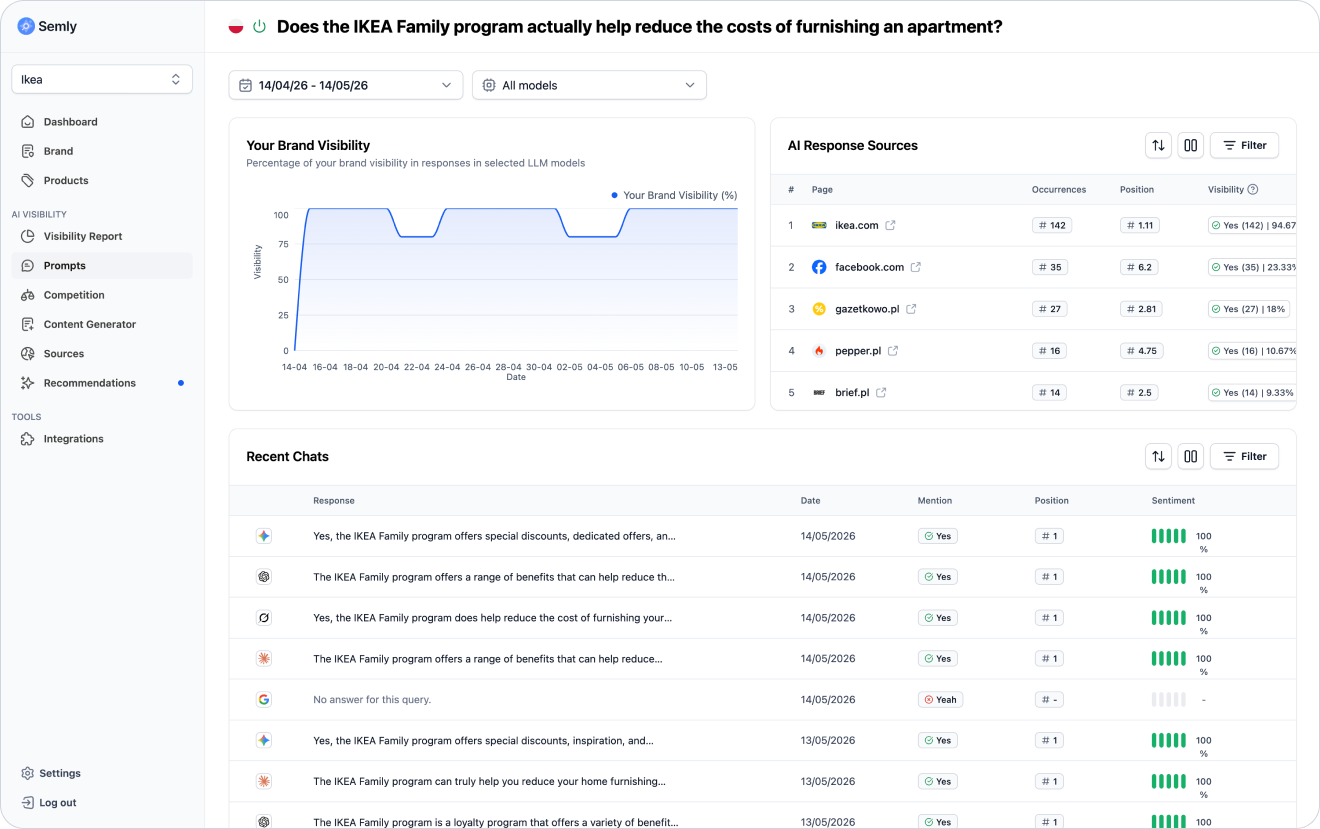
Prompt details show the analysis of one specific question asked to AI models. This is the place where you can see not only general metrics, but also the actual model responses, brand position, sentiment, sources, and visibility changes over time.
This makes it easier to understand what affects your brand’s result for a specific user question.
A prompt is a question or instruction that a user can give to an AI model.
Example:
I’m looking for a store where I can order modern living room furniture with delivery and assembly. Where’s the best place to look for it?
Prompt details show how AI models respond to this one specific question.
In this view you can check:
whether your brand was mentioned
which position it appeared in
what sentiment the answer has
which AI models generated the answers
which sources were used
which competitors show up for the same question
how visibility changes over time

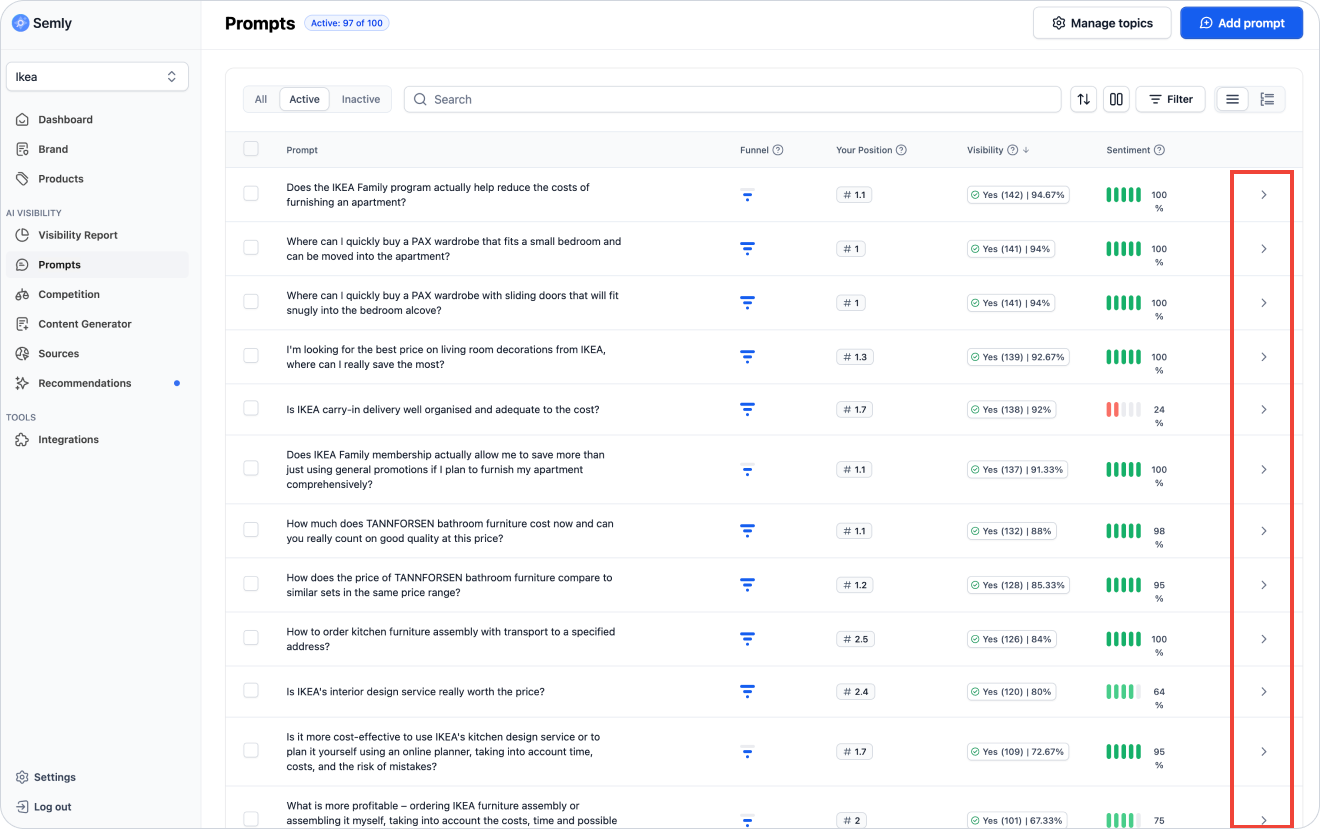
To go to the prompt details:
Log in to the Semly panel
Select the right project
Go to the Prompts section or Visibility report
Click the selected prompt
Open the detailed analysis view
After opening the prompt details, start with the basic information.
Check:
prompt content
prompt topic
prompt status
brand visibility
brand position
sentiment
AI models covered by the analysis
latest answers
answer sources
This lets you quickly see if a prompt works the way you want and if it’s important for your brand.
Prompt visibility shows how often your brand appears in AI answers for a given question.
Example:
If visibility is 30%, it means your brand was detected in 30% of analyzed answers for this prompt.
Visibility helps you assess whether AI associates the brand with a specific user need.
High visibility means that AI often includes your brand in answers to a given question.
This can mean that:
the brand is well connected with the given category
the site responds well to this intent
sources support the brand
product data is well matched
AI has enough information about the brand
Low visibility means that your brand appears rarely or doesn’t appear at all.
This may mean that:
AI doesn’t associate the brand with this question
the competition has stronger sources
there’s not enough content answering this specific intent
the brand description is too generic
product data needs improvement
the site may be harder for AI bots to access

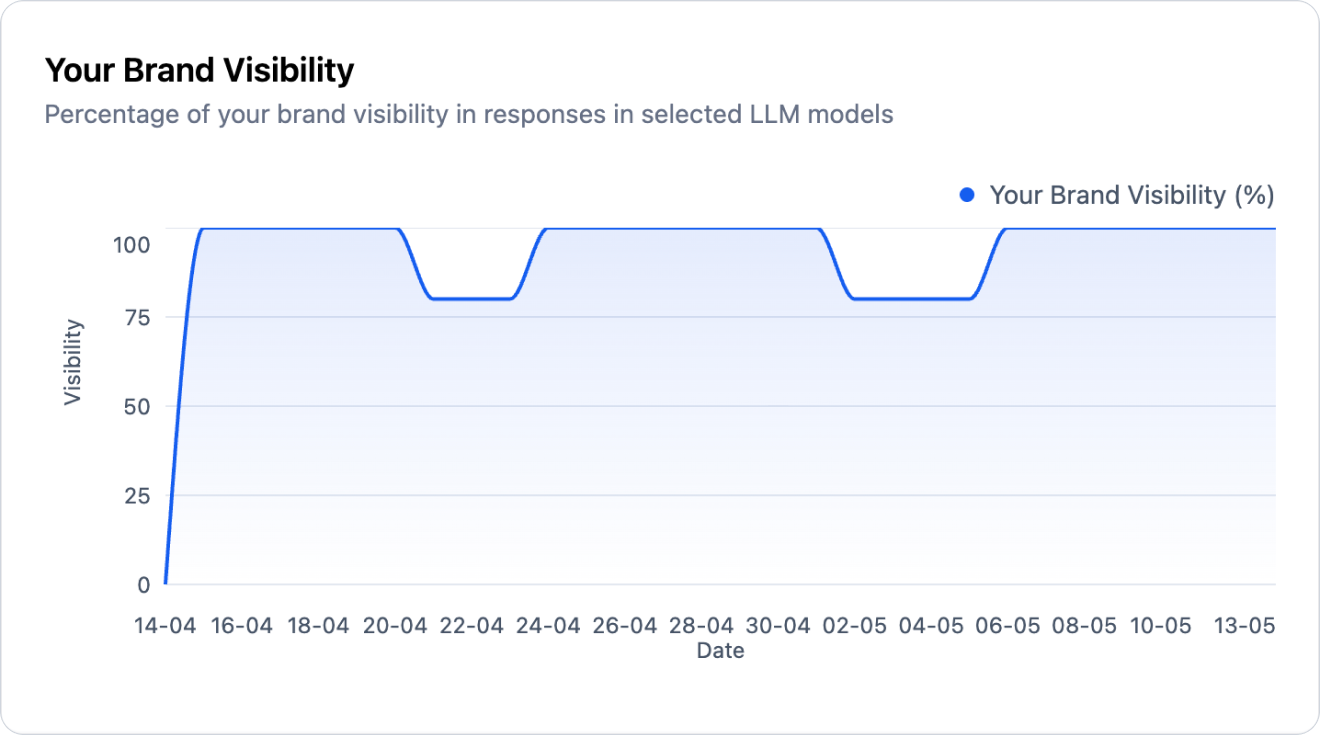
The chart in the prompt details shows how the brand’s visibility has changed over time for a single question.
This way you can check whether the result:
is growing
is dropping
is stable
changes after implementing the recommendations
differs between days
reacts to new content or sources
An increase can mean that the AI has started to connect your brand with a given question more often.
Possible reasons:
implementing recommendations
improving the content
updating product data
better website accessibility
new sources appearing
a change in the AI model’s answer
A drop can mean that the brand shows up less often in answers for this prompt.
It’s worth checking:
does the drop affect one model or multiple models
did the competition gain visibility
did the sources of answers change
are the page and the product file available
did new recommendations appear
Position shows in which place your brand appeared in the AI answer if the model lists several brands, stores, products, or solutions.
Example answer:
Competitor A
Your brand
Competitor B
In this case, your brand has position #2.
#1 means the brand is the first recommendation
#2-#3 means high visibility, but not full dominance
#4 and lower means the brand is visible, but might be less noticeable
no position means the brand wasn’t detected in the answer

Sentiment shows the tone in which AI describes your brand in response to a given prompt.
It can be:
positive
neutral
negative
AI describes the brand in a positive way, points out its advantages, or recommends it as a good solution.
Example:
The brand is a good choice for customers looking for a wide range of products and convenient delivery.
AI mentions the brand but without a clear evaluation or recommendation.
Example:
The brand offers products in this category.
AI points out limitations, lack of data, problems, or a poor match to the question.
Example:
There isn’t enough information to clearly recommend this brand.
In the prompt details you can see real responses generated by AI models.
This is a very important part of the analysis, because the numbers show the result, but the answer shows the context.
In the model responses, check:
whether the brand was mentioned
whether the brand was recommended
how the AI describes the brand
whether the description is specific or general
whether competitors show up
whether the model points to sources
whether the answer contains incorrect or outdated information
whether the user could make a decision based on this answer
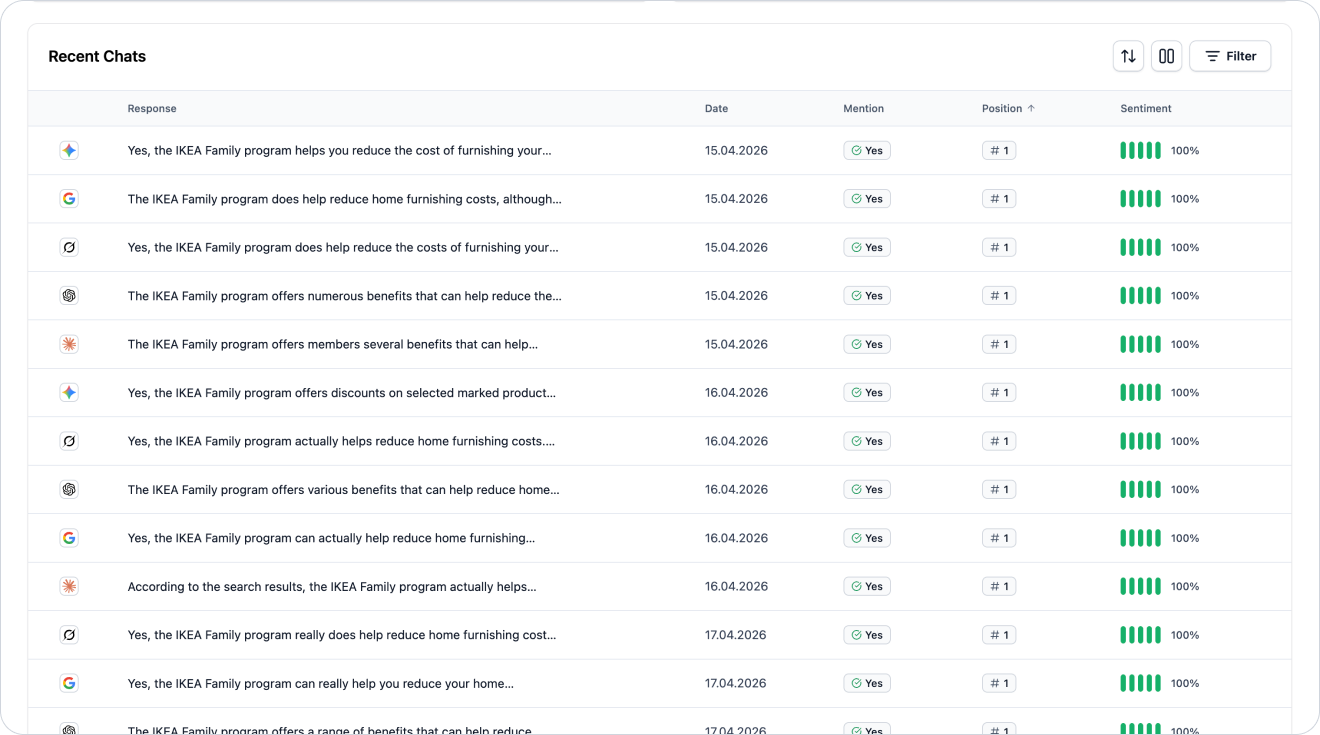
Different AI models can respond differently to the same prompt.
Your brand might be visible in one model but invisible in another. It can also have a different position or sentiment depending on the model.
It’s worth comparing:
ChatGPT
Gemini
Claude
Grok
Google AI Overviews and Google AI Mode
Check:
which model mentions your brand most often
which model shows the competition
does the sentiment differ between models
are the sources similar or different
does one model use information that the other one doesn’t use
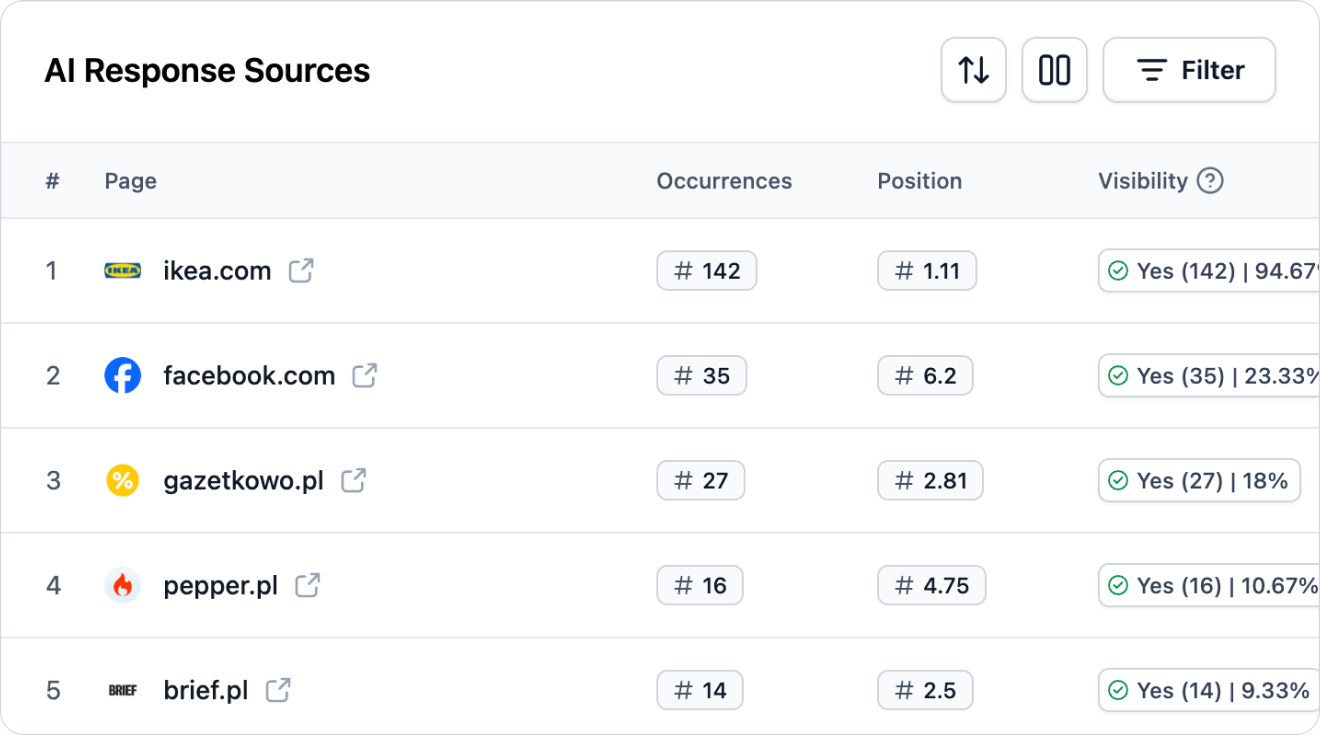
Sources show which websites and materials the AI uses when answering a given prompt.
In the prompt details, sources help you understand why the AI chose specific brands or recommendations.
Check:
what domains show up in the answer
is your website visible as a source
do the sources support your competition
are the sources up to date
do the sources cover the right topic
whether there are rankings, guides, or directories
is your brand missing from important sources
Example:
If, for a prompt about choosing an e-commerce platform, AI often uses rankings and comparisons, it’s worth checking whether your brand is present in those sources or whether you have your own comparison content.
Prompt details help you check which brands show up for the same question.
Pay attention to:
which brands show up most often
which brand is in first position
does the competition have better sentiment
is the competition described more concretely
what advantages of the competition does AI point out
what sources does AI use for the competition
does your brand appear together with the competition or is it skipped
If the competition shows up often and your brand doesn’t, it may mean a visibility gap.
Not every prompt has the same business weight.
A valuable prompt is one that can influence the user's decision.
Such a prompt often includes:
a specific need
a product or service category
a comparison of brands
an intention to choose a provider
a question asking for a recommendation
information about the budget
location
the expected outcome
Examples of valuable prompts:
Which platform should I choose to run an online store with wholesaler integrations?
Where can I buy a bed with storage for a small bedroom?
Which sports supplement store has fast delivery?
Which payment provider should I choose for an online store?
If your brand doesn’t show up for an important prompt, it doesn’t automatically mean there’s an error. It’s a signal that the AI model doesn’t have a strong enough reason to mention the brand in that context.
Check:
is the prompt well matched to the offer
does the brand profile describe this category or service
are the products imported and well described (online stores only)
does the site contain content that addresses this topic
is the AI using sources where your brand doesn’t appear
does the competition have better sources
does Semly show recommendations for this area
Possible actions:
improve the brand description
complete the product data (online stores only)
add or improve the content on the site
generate and publish articles in the Content Generator
expand the knowledge base in Semly
check the robots.txt file
make sure you’re present in important sources
add similar prompts for further analysis

If the brand appears in the answer but further down the list, it means the AI knows it but doesn’t treat it as the main recommendation.
Check:
who shows up higher
what advantages does AI point out for the competition
does your brand have a concrete enough description
do the contents show the differences compared to the competition
do the sources support your brand
are the product data complete
does the AI answer contain outdated information
Possible actions:
clarify the brand’s advantages
expand comparison content
improve product or service descriptions
generate and publish 2 - 5 pieces of content for the selected prompt using the Semly Content Generator
increase presence in sources
implement Semly’s prompt-related recommendations
If AI describes the brand neutrally, it may mean it has too little data about its advantages.
If the sentiment is negative, it’s worth checking whether the model is using outdated or unfavorable sources.
Check:
how exactly AI describes the brand
whether any accusations or limitations show up
whether the answer contains outdated information
what sources support the answer
whether you clearly describe the brand’s advantages on the site
whether reviews and external content are consistent with the brand positioning
Possible actions:
improve the brand description
add specific advantages
create content that explains the offer
update outdated information
make sure you have better external sources
prepare an FAQ that answers customers’ doubts
If you don’t know where to start, use a simple framework.
Check whether the question fits your offer well.
See how often the brand shows up in the answers.
Assess whether the brand is one of the first recommendations.
See whether the AI describes the brand in a positive, neutral, or negative way.
Check the real context of the answers and the way the brand is described.
See which brands appear instead of yours or next to it.
See which domains the AI uses.
Check if Semly suggests actions to take for this area.
Avoid jumping to conclusions too quickly.
The most common mistakes are:
analyzing only one AI model
judging the result based on too short a period
ignoring the content of the answer
looking only at visibility without positions
skipping sentiment
not analyzing sources
not comparing results with competitors
focusing on prompts without business value
not taking action after detecting a gap
After going through the details of the prompt, pick your next step.
You can:
improve your brand profile
improve product data or service descriptions
create new content in the Semly Content Generator
expand the knowledge base in Semly
check competitors’ sources
add similar prompts
implement Semly’s recommendations
monitor changes in visibility over time
How to read the Visibility Report
Learn how to analyze the Visibility Report in Semly and check how your brand appears in AI answers.
How to create prompts and topics
Learn what prompts are in Semly, how to create good questions for AI monitoring, and how to organize them into topics.
How to add competition
Find out how to add competitors in Semly and how to use competitor analysis to check brand visibility in AI answers.
Key metrics
How to read results and metrics in Semly. A guide to brand visibility analytics in AI answers.
What AI answer sources are
Find out what sources are in Semly and why they matter a lot for brand visibility in AI answers.
How to read Semly recommendations
Find out how to use Semly recommendations and turn AI analysis results into concrete actions that improve brand visibility.
Prompt details show how your brand performs for one specific user question. This is the best place to analyze the reasons: why the brand is visible, why it’s skipped, why the competition wins, or why the sentiment isn’t good enough.
The most important rules:
analyze the prompt in the context of the user’s intent
check visibility, position, and sentiment together
read real responses from AI models
compare results between models
analyze the sources of the responses
check the competition
look for prompts with high purchase intent
implement recommendations that come from the analysis