This article collects the most important issues that may come up during the first project setup and everyday work with the Semly panel.
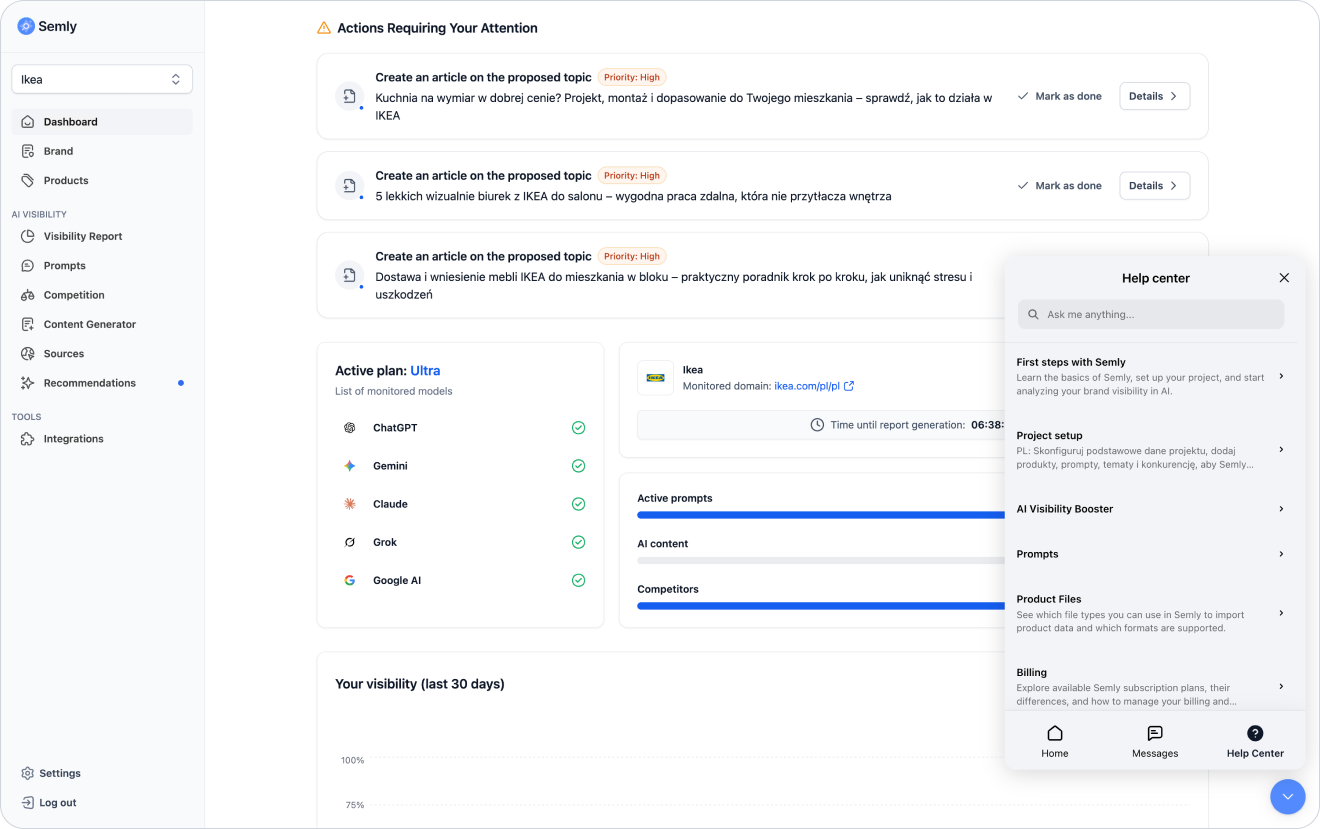
Semly is a platform for monitoring and increasing brand visibility in answers generated by AI models such as ChatGPT, Gemini, Claude, Grok, Google AI Mode, or Google AI Overviews.
Semly works like a team of specialized AI agents working 24/7 on your brand’s visibility in LLM models. The agents analyze AI responses, prompts, competitors, sources, content, and brand data, and then point out actions that can help increase the chances of the brand appearing in AI recommendations.
Semly helps you check:
whether AI knows your brand
which questions your brand appears for
whether AI recommends it
how it compares to competitors
which sources AI models use
which actions can improve visibility

The first data may appear after monitoring is launched and the AI models’ answers are processed.
How quickly the data appears can depend on:
number of prompts
number of analyzed AI models
active plan
project configuration
site availability
product feed availability
scope of analysis
There can be a few reasons why your brand doesn’t appear in AI answers.
The most common reasons:
AI doesn’t have enough information about the brand
the brand isn’t well connected with a given prompt
the competitors has stronger sources
the site is missing content that answers the user’s question
the brand description is too generic
products have poor descriptions
the site may be poorly accessible for AI bots
there’s not enough content in the knowledge base
the AI model uses sources where your brand doesn’t appear
What you can do:
complete your brand profile
add products or a Google Shopping XML file (online stores only)
check the prompts
analyze the sources
compare yourself with the competitors
follow Semly’s recommendations
generate content for the most important visibility gaps

The competitors may show up more often if AI models have more data, sources, or content that connect it to a given user question.
Possible reasons:
the competitors appears in rankings
the competitors has more reviews
the competitors has better how-to content
the competitors has more detailed product descriptions
the competitors is quoted more often
the competitors shows up in sources used by AI
your brand doesn’t have content for a given prompt
your offer is described too generally
What to check:
prompts only for the competitor
sources supporting the competitors
the brand’s position in the answers
sentiment of the answers
Semly’s recommendations
gaps in content and product data
Different AI models can generate different answers to the same prompt.
The differences can come from:
other data sources
a different way of generating answers
model updates
different interpretations of the prompt
different mechanisms for citing sources
differences in data availability
a different context for the answer
Example:
ChatGPT might mention your brand, Gemini might recommend a competitor, and Claude might respond more neutrally.
AI answers aren’t fixed. The same prompt can give different results depending on time, model, sources, and context.
Visibility can change because of:
AI model updates
new sources on the Internet
changes on the brand’s website
changes in competitors’ content
new articles in the knowledge base
product feed updates
seasonality of queries
implemented recommendations
changes in source availability
Semly analyzes visibility, shows the sources of problems, and prepares recommendations. Some actions are done automatically, and some need to be implemented manually.
Examples of automatic actions:
generating an article
preparing content in the Content Generator
publishing in the knowledge base
marking the recommendation as completed
preparing ready-made content or files
Examples of manual actions:
pasting the llms.txt file
updating robots.txt
adding a link in the page footer
adding the knowledge base to the XML sitemap
improving content in the CMS
updating data in the store

In most cases, the basic Semly setup doesn’t require installing any code on your site.
You can use Semly via:
a Google Shopping XML file (online stores only)
ready-made integrations
a knowledge base on your subdomain
Some actions may require technical changes, e.g. DNS configuration, adding a link in the footer, updating robots.txt or adding llms.txt.
Just monitoring visibility in Semly shouldn’t interfere with your site’s SEO, because it doesn’t require installing scripts or changing the code.
SEO can only be affected by the actions you implement outside Semly, such as:
publishing new content
adding a knowledge base
internal linking
updating robots.txt
changes in the sitemap
changes in the site structure
improving product descriptions
Google Shopping XML is a product file that contains data about products in an online store.
It can contain, among other things:
product names
product descriptions
prices
availability
categories
photos
links to products
product IDs
brand
EAN or GTIN
Semly uses the XML file to better understand the store’s offer and analyze it in the context of questions asked to AI models.
If the products weren’t imported, check the most common reasons.
Possible issues:
the link doesn’t lead directly to the XML file
the file requires a login and password
the login details are incorrect
the file is empty
the file contains technical errors
the server blocks access to the file
the file address has been changed
the file has incorrect encoding
the file doesn’t contain the required product data
What to do:
open the XML link in the browser
check the link in incognito mode
make sure you can see the XML structure
add login and password if the file is protected
check the file encoding
contact a technical person or Semly support
A prompt is a question or instruction from the user to the AI.
In Semly, a prompt represents a real user intention, e.g. a question about a product, a service, a comparison or a recommendation.
Example of a weak prompt:
living room furniture
Example of a good prompt:
I'm looking for a store where I can order modern living room furniture with delivery and assembly. Where's the best place to look for it?
The more well-chosen prompts you add, the better market coverage you'll get in Semly. A larger number of questions lets you better see for which customer intentions your brand is visible, where competitors show up, and in which areas you have the biggest gaps.
However, it's worth remembering that it's not just the number of prompts that matters, but also their quality. Prompts should reflect real customer questions, different stages of the purchase decision, and the most important product or service categories.
A good set of prompts should include:
questions about the most important categories of products or services
purchase-related questions
comparison questions
educational questions
questions about specific customer problems
questions about availability, price, delivery, or location
questions related to the competitors
Sources are domains, pages, and materials that AI models can use when generating answers.
Sources can be:
brand website
blog
knowledge base
product pages
category pages
rankings
catalogs
reviews
forums
industry media
marketplaces
competitors’ websites
Sources help you understand why AI recommends a given brand or why the competitors shows up more often.
The Semly knowledge base is a public page with articles prepared based on the analysis of brand visibility in AI.
It can run under your subdomain, e.g.:
knowledge.yourdomain.comThe knowledge base is available for users and LLM bots. It’s technically optimized for AI models and can include an automatic sitemap, llms.txt, structured data, content in Markdown and JSON-LD, and public access via API and MCP.
Yes. Articles in the knowledge base should be unique and shouldn’t be copied 1:1 from the blog, product page, or category page.
To avoid duplicate content:
create articles for specific prompts
describe the topic from a different perspective
add practical context
link to existing pages instead of copying their content
update articles according to the recommendations
avoid repeating the same paragraphs

Yes, it’s a good idea to add a link to the knowledge base from your website, for example in the footer.
It’s also worth adding the knowledge base to the XML sitemap.
This way:
users will find content more easily
bots can detect the knowledge base faster
the knowledge base will be better linked with the main domain
articles can be more easily analyzed by AI systems
The llms.txt file is a simple text file that helps AI systems understand what a site is and where its most important resources are located.
It can contain:
brand description
link to the sitemap
link to the knowledge base
links to the most important sections
information about the language and market
tips for AI systems
llms.txt file doesn’t replace good content, but it helps AI systems find the most important resources faster.Not always. AI models and systems that analyze sources may need some time to take new content or technical changes into account.
The effect can be influenced by:
frequency of model updates
availability of new sources
quality of implemented content
correctness of linking
site availability for bots
competitors in a given topic
number of monitored prompts
changes in product data
If you need help, write to the Semly support team:
[email protected]It’s useful to include the following in your ticket:
account email address
brand name
domain address
short description of the problem
screenshot
link to the XML file if the problem concerns products
prompt name if the problem concerns a report
information about when the problem occurred
Welcome to the Semly Help Center
Knowledge Center about GEO and AI Search.
Quick start with Semly
Initial account setup.
Key indicators
How to read results and indicators in Semly. A guide to analytics of brand visibility in AI answers.
How to complete your brand profile
Find out how to correctly fill in your brand data in Semly so the system can better analyze your company’s visibility in AI answers
How to add products or a Google Shopping XML file
Find out how to add products to Semly using a Google Shopping XML file or a ready-made integration, and why up-to-date product data is important for analyzing brand visibility in AI.
How to read the Visibility Report
Find out how to analyze the Visibility Report in Semly and check how your brand appears in AI answers.
How to read Semly recommendations
Find out how to use Semly recommendations and turn AI analysis results into concrete actions that improve brand visibility.
How to set up a knowledge base on a subdomain
Find out how to launch the Semly knowledge base on your own subdomain and why this matters for brand visibility in AI answers.
The most common questions are usually about project setup, brand visibility, differences between AI models, product import, sources, recommendations, and the knowledge base.
The most important rules:
complete your brand profile
add products or an integration
create prompts as natural user questions
analyze the report together with competitors and sources
implement recommendations starting from the highest priority
publish unique content in the knowledge base
add a link to the knowledge base on your website
track trends over time
if you have any issues, contact [email protected]